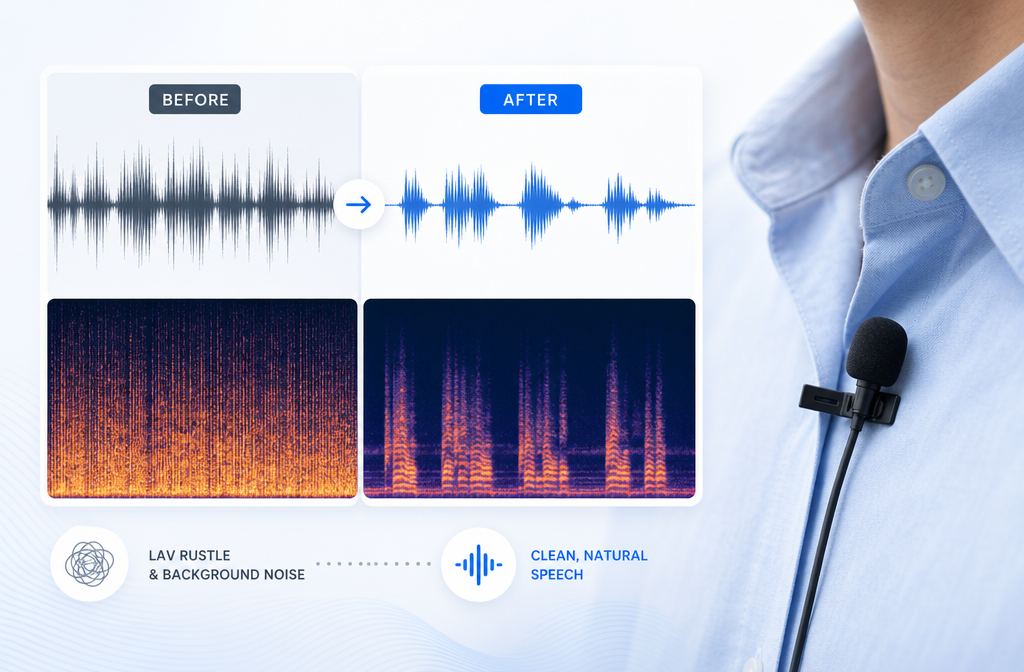
How to Remove Lav Mic Rustle from Audio Online: Fix Clothing Noise in Interviews, Weddings, and Talking-Head Video
Quick Answer
Yes, you can often remove lav mic rustle from audio online or at least reduce it enough to make speech much easier to understand. Lav rustle is the scratchy, brushing, crackly noise created when a lavalier mic or its cable rubs against clothing. It is harder to fix than steady hiss or hum because it changes from moment to moment and often overlaps the voice itself, which is why generic noise reduction may only help a little. Dedicated speech-first cleanup and selective processing usually work best.
In practice, results depend on severity:
- Light rustle: often cleans up well.
- Moderate rustle: usually can be reduced a lot, though not always erased.
- Severe rustle: may only be softened, especially if the noise sits on top of nearly every word.
If you need a fast browser workflow, upload the file, preview the cleaned speech, back off the processing if the voice starts sounding watery or dull, and export. If only a few words are bad, process short sections instead of the full track. If you want the simplest starting point, try SimpleClean and preview the result before exporting.
Clean hum and hiss with SimpleClean
What lav mic rustle actually sounds like
Lav rustle is not just “noise.” It usually sounds like one or more of these:
- Scratchy fabric brushing
- Short crackles or crackling bursts
- Soft thuds from clothing contact
- Brushing or scraping during head and body movement
- Cable rub traveling into the mic
iZotope’s de-rustle materials describe lavalier rustle as a dialogue-repair problem distinct enough to warrant dedicated processing, and its technical write-up explains why: the noise is highly variable over time and can range from crackles to thuds while overlapping speech content. That makes it much tougher than a constant background bed such as fan noise, tape hiss, or electrical hum.
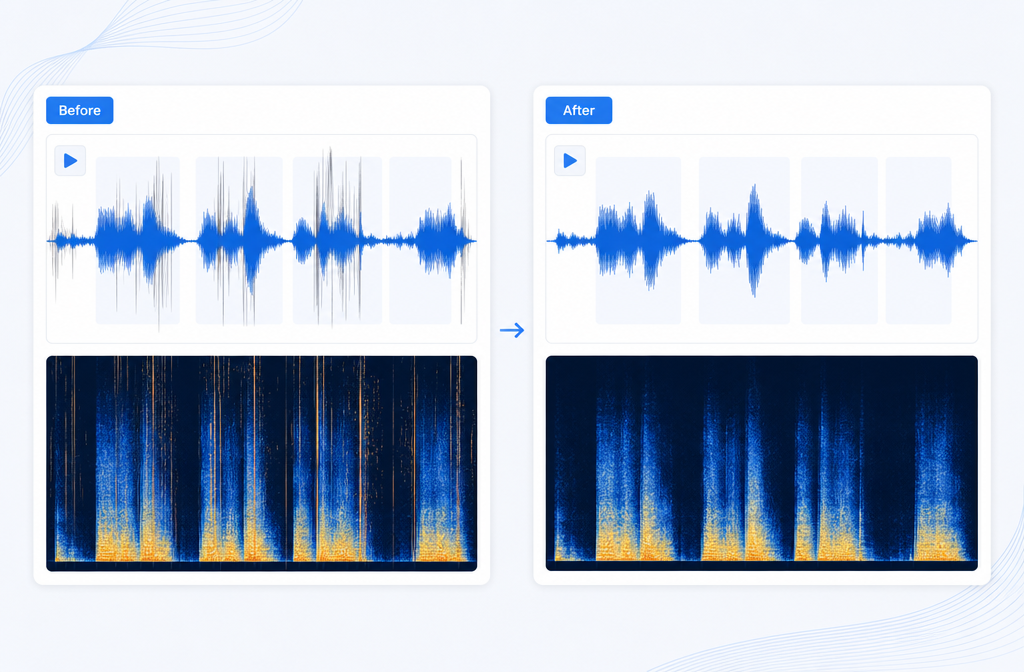
Why lav rustle is harder to remove than normal background noise
Classic noise reduction works best when the unwanted sound is relatively steady. Audacity’s support documentation, for example, describes noise reduction around a sampled noise profile, which is useful for more consistent noise patterns. Lav rustle does not behave that way. It changes constantly as fabric shifts, the speaker turns, a jacket moves, or the cable brushes the shirt.
That means two things:
- There is no single perfect “noise print” for the whole recording.
- The rustle often overlaps speech frequencies and timing, so aggressive removal can also damage the voice.
That is why a good lav mic rustle remover should be treated as a salvage tool, not magic. The goal is usually cleaner, less distracting speech, not a perfect studio restoration.
Diagnosis table: lav rustle vs other common audio problems
| Problem | What it sounds like | Typical cause | Best first move |
|---|---|---|---|
| Lav mic rustle | Scratchy brushing, crackle, fabric scrape, intermittent thuds | Mic capsule or cable rubbing clothing | Use speech-focused cleanup; process bad sections selectively if needed |
| Mouth clicks | Tiny saliva clicks, lip smacks, little ticks between words | Mouth noise close to mic | Use a mouth-click workflow, not de-rustle |
| Plosives | Low-frequency pops on P and B sounds | Air blasts hitting mic | Use plosive reduction or targeted EQ/repair |
| Electrical hum | Steady 50/60 Hz buzz and harmonics | Power, grounding, wiring | Use hum removal or notch-based cleanup |
| Room reverb | Echoey, distant, roomy speech tail | Reflective space | Use dereverb tools; rustle tools will not fix it |
| General background noise | Fan, HVAC, traffic, crowd, room tone | Environment | Use noise reduction or AI background cleanup |
| Handling noise | Low bumps, knocks, cable yanks | Touching the mic, recorder, or cable | Spot-edit or repair isolated hits |
This distinction matters because creators often search for “fix lapel mic crackle” or “remove shirt rubbing noise from video audio” when the problem is actually mouth clicks, plosives, or handling noise. Using the wrong repair type can make the voice worse without solving the real issue.
If your issue is closer to a different symptom, these guides may help:
- remove mouth clicks from audio online
- remove plosives from audio online
- remove hum from audio online
- remove reverb from video online
- remove background noise from video online
Can AI remove clothing rustle from a lav mic?
Sometimes, yes. That is one reason commercial tools from companies like Boris FX and iZotope treat lav rustle as its own restoration category. iZotope’s technical explanation specifically frames de-rustle as a hard separation problem because the interference is non-stationary and mixed into dialogue. More broadly, machine-learning approaches are relevant to difficult speech-versus-noise separation tasks, which is consistent with the research direction reflected in the provided DAFx paper.
For creators, the practical takeaway is simple: AI speech cleanup is often a better fit than generic denoise when the noise is rubbing, brushing, and changing all the time. But even strong cleanup may only reduce the distraction rather than remove every trace.
Best online workflow to remove clothing rustle from audio
If you want to remove clothing rustle from audio without opening a DAW or plugin chain, use a simple browser-first workflow.
- Upload the original file. Start with the cleanest source you have, whether that is WAV, MP3, or video such as MP4 or MOV.
- Run speech cleanup. Let the tool reduce distracting noise while keeping the dialogue natural.
- Preview carefully. Listen for improvements in clarity, but also check whether consonants start sounding phasey, watery, or dull.
- Dial back if needed. Overprocessing can make voices sound unnatural, especially when rustle overlaps every word.
- Export the repaired file. If your project is video, replace the original audio in your editor if needed.
- Spot-fix the worst moments. If only a few phrases are damaged, processing short sections often preserves better overall voice quality than treating the full track heavily.
This mirrors standard restoration advice from pro-audio workflows as well: preview, avoid overprocessing, and use selective cleanup where practical.
Need a fast starting point? Upload the file to SimpleClean, preview the result, and keep the voice natural rather than chasing total removal on impossible sections.
Clean hum and hiss with SimpleClean
When to process the whole track vs only the bad sections
- Process the whole track when the rustle is present through most of the recording at a light or moderate level.
- Process only bad sections when the recording is mostly clean and only certain turns, hugs, gestures, or clothing shifts cause bursts of rubbing noise.
- Use the lightest acceptable setting if the speaker’s voice starts to lose detail.
This is especially useful for interviews and documentary clips, where one answer may be clean while another gets wrecked when the subject adjusts their jacket.
Expected results by severity
| Severity | What it usually means | What to expect | Best approach |
|---|---|---|---|
| Light | Occasional soft brushing between phrases or under a few words | Often cleans well | Full-track cleanup with conservative settings |
| Moderate | Frequent crackle/brush noise but speech is still intelligible | Usually reduced clearly, not always eliminated | Preview carefully and combine full-track plus spot fixes |
| Severe | Rustle sits on top of nearly every word or dominates the recording | Usually only softened | Selective salvage, alternate mic track, or rerecording/ADR if possible |
If you are wondering when lav rustle is impossible to fully remove, the answer is usually: when the rubbing noise is as loud as the voice and constantly overlaps the speech. At that point, restoration can improve listenability, but it may not restore a polished result.
Best for: common creator scenarios
Interviews
Interview rustle often comes from a lav hidden under a dress shirt, blouse, or jacket. Because the voice matters more than background realism, a speech-first online cleanup workflow is often the fastest fix. If only one answer is noisy, export and repair that section rather than the full interview.
Weddings
Wedding vows and officiant audio are classic rustle problems: lapel contact, hugging, movement, formalwear fabric, and no chance for a retake. Moderate cleanup can make vows much more usable, but severe rubbing during the key lines may still need spot repair or backup audio from another source.
Documentary
Documentary dialogue is often irreplaceable. In these cases, the right goal is intelligibility and reduced distraction, not perfection. Process conservatively and keep an ear on whether the speaker still sounds real.
YouTube talking-head video
A hidden lav under a T-shirt or hoodie often creates shirt brushing when the speaker turns. Online cleanup is convenient here because you can upload the finished video file, clean the dialogue, and move on without a plugin stack. After cleanup, Best AI Captions can help add captions and subtitles, which also makes mildly imperfect audio easier for viewers to follow.
Online course recordings
Course content often has long takes with only occasional rustle. That makes selective repair especially valuable. Once the lesson is cleaned, Translate Dub can help translate, dub, and caption the video for multilingual learners.
How to prevent lav rustle next time
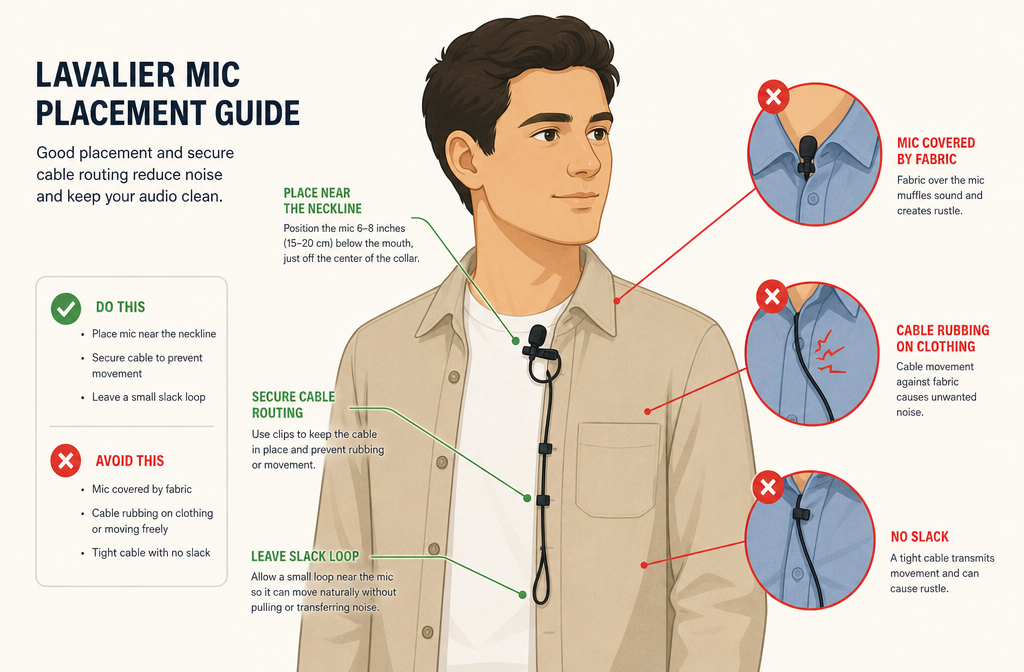
Prevention is easier than repair. Shure’s mic placement guidance supports placing lavs close to the mouth and avoiding placement under clothing or anywhere something can rub the microphone.
- Keep the lav outside clothing when possible.
- Place it near the neckline or chest for clear speech pickup.
- Make sure fabric does not brush the capsule.
- Secure the cable so it does not swing or rub.
- Use a windscreen or concealer if your setup allows.
- Ask talent to do a short movement test before the real take.
- Listen on headphones while the subject turns, sits, hugs, or gestures.
Those few steps can prevent the most common “fix lapel mic crackle later” disasters.
Online vs desktop restoration: which is best for you?
| Option | Best for | Tradeoff |
|---|---|---|
| Online cleanup | Creators who want fast upload-clean-preview-export repair on audio or video files | Less surgical than a full restoration suite |
| Desktop DAW/plugin workflow | Post-audio specialists who need detailed, section-by-section control | Slower and more complex for beginners |
| Rerecording / ADR | Severe rustle over critical lines when performance can be repeated | Often impossible for live events, interviews, or documentary |
If your main goal is speed and usability, online is usually the best first pass. If the take is mission-critical and heavily damaged, a desktop restoration workflow or alternate recording may still be necessary.
After cleanup: repurpose and publish the repaired video
Once the dialogue is usable again, turn the recovered clip into publishable content. Add subtitles with Best AI Captions, localize with Translate Dub, and if you are distributing the cleaned interview, wedding teaser, talking-head clip, or course lesson across multiple channels, Mallary.ai is a natural fit for scheduling and social publishing workflows.
FAQ
Can you fix rustle in video audio?
Yes, often. If the rustle is in the camera video file, you can clean the embedded audio and then export a repaired version or replace the original track in your editor.
Can MP4 interview audio be cleaned online?
Yes, this is a common use case in browser-based cleanup workflows. The same applies to other common audio and video formats mentioned in the brief, such as WAV, MP3, and MOV.
How do I fix crackling from a lapel mic in a video?
First confirm it is actually lav rustle and not clipping, mouth clicks, or electrical crackle. If it sounds like fabric brushing or cable rub, use speech-focused cleanup, preview the voice, and reduce the amount of processing if the dialogue starts sounding artificial.
Can you remove shirt rubbing noise from audio without Audition or RX?
Often, yes. A browser workflow is the simplest place to start if you do not want a full desktop restoration setup. Just keep your expectations realistic on severe recordings.
What is the difference between lav rustle and mouth clicks?
Lav rustle sounds like fabric brushing, scratching, or cable rub. Mouth clicks are tiny saliva or lip noises created by the speaker’s mouth. They need different repair approaches.
When is lav mic rustle impossible to fully remove?
Usually when the rubbing noise is loud, constant, and directly overlaps almost every word. At that point, cleanup may improve intelligibility but not fully restore clean natural speech. If the line is critical and rerecording is possible, ADR may be the better option.
Final take
If you need to remove lav mic rustle from audio online, the key is diagnosing the problem correctly and setting realistic expectations. Light rustle can often be cleaned well. Moderate rustle can usually be reduced enough to save the take. Severe rustle may only be softened. Start with the least aggressive repair that improves intelligibility, process short sections when only a few phrases are bad, and focus on preserving a natural voice.
For a fast browser-based workflow, you can start with SimpleClean and preview the result before exporting.
Clean hum and hiss with SimpleClean
Sources and further reading
- RustleRemover - Plugin for Removing Lav Mic Rustle Noise | Boris FX - Supports the claim that lav mic rustle is a recognized, distinct cleanup problem addressed by dedicated tools.
- Remove Lav Mic Rustle with De-rustle in RX 7 | iZotope - Supports the explanation that dedicated de-rustle processing exists for dialogue repair.
- DeRustle: Removing Lavalier Microphone Noise with Deep Learning | iZotope Tech Blog - Supports the explanation that rustle is variable over time, can range from crackles to thuds, and often overlaps speech.
- Noise reduction & removal | Audacity Support - Supports the contrast between classic noise reduction and more variable, non-steady noises.
- How to reduce noise and restore audio in Adobe Audition - Supports general restoration terminology and the concept of careful previewing in cleanup workflows.
- Mics and Mic Techniques for Conferencing Systems | Shure - Supports prevention guidance around lav placement near the mouth and avoiding rubbing or covered placement.
- A DNN-Based Approach to Improving Intelligibility of Noisy and Reverberant Speech for Hearing-Impaired Listeners | DAFx 2018 paper listing de-rustle comparison reference - Provides scholarly support that machine-learning approaches are relevant to difficult speech/noise separation problems.