When you're looking for the best online audio editor, you're really looking for a tool that gives you professional sound without the headache of a traditional audio workstation. Tools like SimpleClean for noise removal or Descript for its unique transcript-based editing are leading the pack. They focus on getting the job done fast, which is a lifesaver for creators who need clean audio for podcasts, videos, and voiceovers.
Why Crystal-Clear Audio Is Non-Negotiable for Creators
In a sea of content, your audio quality is the first impression you make. If your listeners are met with muffled dialogue, distracting background hum, or jumpy volume levels, they'll assume your content is amateur and click away before you even get to your point. For any creator, that translates directly to lost subscribers, poor engagement, and a hit to your brand's credibility.
This pressure for quality has created a huge demand for user-friendly editing tools. The global market for audio editing software was valued at a massive USD 4.72 billion in 2024. It’s expected to more than double, hitting USD 10.29 billion by 2032, with the creator economy fueling much of that growth. You can explore more insights on the audio software market growth to see just how big this space is getting.
The Modern Creator's Challenge
The real problem for most creators isn't just getting good audio—it's getting it done efficiently. Professional-grade Digital Audio Workstations (DAWs) are incredibly powerful, but they’re also notoriously complex, often demanding a steep learning curve. Creators need tools that don't disrupt their flow but instead enhance it, delivering pro results without requiring weeks of tutorials. This is where the right online audio editor really proves its worth.
The best online tools aren't trying to replace a full-blown DAW. They’re designed to solve the most common, time-sucking problems—like background noise, room echo, and inconsistent levels—with surgical precision and speed.
To help you find the right fit, here's a quick look at the top contenders. This table breaks down what each tool does best, who it's for, and how it works, giving you a solid starting point for our deeper dive.
Top Online Audio Editors at a Glance
| Tool Name | Best For | Key Feature | Pricing Model | Ease of Use |
|---|---|---|---|---|
| SimpleClean | AI Noise Reduction | One-click background noise and echo removal from audio/video files. | Free tier, Subscription, Pay-as-you-go | Excellent |
| Descript | Podcast Production | Transcript-based editing that lets you edit audio by editing text. | Free tier, Subscription | Very Good |
| Podcastle | All-in-One Podcasting | AI-powered recording, editing, and audio enhancement in one platform. | Free tier, Subscription | Very Good |
| Audo Studio | Voice Enhancement | Advanced AI algorithms focused on improving vocal clarity and presence. | Free tier, Subscription | Excellent |
| VEED.IO | Video with Audio | Integrated video editor with strong, easy-to-use audio cleanup tools. | Free tier, Subscription | Very Good |
This overview gives you a sense of the landscape. Each of these tools excels in its own way, and the best choice ultimately comes down to your specific needs and workflow. Now, let’s get into the details to see how they really stack up against each other.
Key Criteria for Choosing Your Audio Editor
Picking the right online audio editor can feel like a shot in the dark when every tool on the market promises studio-quality sound. To cut through the marketing hype, you need a solid framework for evaluating what actually matters for your work. Instead of getting bogged down in feature lists, let's break down the five core pillars that will point you to the right choice.
This isn't about finding a one-size-fits-all solution. It's about matching a tool's strengths to your specific needs, whether you're a podcaster cleaning up a Zoom interview or a YouTuber trying to save audio from a windy outdoor shoot.
AI Features and Audio Restoration Quality
Let's be honest, the real magic of modern online editors lies in their AI. The absolute must-have feature is automated noise reduction. A good tool can intelligently strip out background hum, city traffic, and annoying fan noise without making the speaker sound like they're talking from inside a tin can. The goal is transparency—the voice should sound natural, not processed.
But basic noise removal is just the starting point. The best tools offer more surgical AI fixes:
- Echo and Reverb Removal: A lifesaver for anyone recording in a less-than-perfect space, like a spare bedroom or a cavernous office.
- Voice Enhancement: This goes beyond simple cleanup. It adds richness, presence, and clarity, giving dialogue that polished, professional sound.
- Plosive and De-Esser Tools: These automatically smooth out those harsh "p" and "b" pops and sharp "s" sounds that are so common with close-up microphones.
A top-tier online audio editor uses its AI as an intelligent restoration engine, not just a simple filter. The aim isn't just to subtract the bad stuff, but to elevate what’s left, preserving the natural tone and performance of the speaker.
The real test is how well these features actually perform. Any tool can claim to have "noise cancellation," but the proof is in the results. For a deeper dive into the tech behind this, our guide on software noise cancellation breaks down how these powerful systems operate.
File Compatibility and Format Support
Your workflow likely involves more than just audio files. If you're creating videos for YouTube or social media, you need an editor that handles video formats natively. Make sure the tool can directly process MP4, MOV, and other common video files. This lets you extract and clean the audio without having to use a separate conversion tool first—a simple step that saves a surprising amount of time and prevents quality degradation.
On the audio side, flexibility is key. Your editor should handle the basics like MP3 and WAV without breaking a sweat, but also support higher-quality formats like FLAC or AAC. Having options for both input and output gives you the freedom to move your cleaned audio into any project, whether it's a high-fidelity podcast or a compressed clip for a website.
Workflow and User Experience
The whole point of using an online tool is to save time. A clunky interface with a steep learning curve completely defeats that purpose. The ideal workflow should feel almost effortless: upload your file, let the AI work its magic, preview the before-and-after, and hit download. Simplicity is a feature, not a compromise.
A great user experience (UX) means you don't need an audio engineering degree to get professional-sounding results. Look for clean designs that minimize clicks and hide complicated settings. And for anyone juggling lots of files, batch processing is an absolute game-changer. Imagine uploading an entire season of podcast episodes or a folder of video clips and having them all cleaned in one go.
Pricing Models and Transparency
Most online audio editors operate on either a subscription or a pay-as-you-go credit system. There’s no right or wrong answer here; it all comes down to your production schedule.
- Subscription Models: Perfect for creators who are consistently producing content. A monthly or yearly plan gives you a predictable budget and a set amount of processing time.
- Pay-As-You-Go Credits: A fantastic option if your projects are more sporadic. You can buy credits for processing time as you need them, with no recurring monthly fees.
Whatever the model, demand transparency. Is there a free trial or a generous free plan that lets you test the tool with your own messy audio? Do unused credits or minutes roll over? Clear, upfront pricing without confusing terms is a huge green flag.
Privacy and Data Security
Uploading your work to a cloud service means you're placing your trust—and your intellectual property—in their hands. A reputable editor will have a privacy policy that's easy to find and understand, clearly explaining how your files are managed.
You need to know the answers to a few key questions: How long are my original and processed files stored? Are they deleted automatically after a set period? Is my connection secure during upload and download? For anyone working with sensitive client projects or unreleased content, a strong, privacy-first policy—like automatic file deletion after seven days—isn't just a nice-to-have, it's a necessity.
Comparing the Leading Online Audio Editors
When you start comparing online audio editors, you quickly realize it's about more than just a list of features. The real differences are in the details—how a tool cleans your audio and whether its workflow actually fits what you’re trying to accomplish. Let's put the top contenders under the microscope to see where they shine and where they fall short.
We'll look at two main camps: the super-fast, AI-powered cleanup tools built for speed, and the more traditional, in-browser DAWs that offer granular control. My goal is to help you figure out which one is right for you, whether you're a podcaster who needs to publish quickly or a filmmaker who obsesses over every audio detail.
AI Noise Reduction Performance
The big promise of any modern audio editor is its AI noise reduction. But how well does it actually handle the annoying stuff like background hum, wind noise, or that echo from recording in an empty room? The real test is whether it can strip out those imperfections without making the speaker's voice sound thin, robotic, or unnatural.
Some tools are incredibly precise, acting like a surgical tool to remove a specific low-frequency hum from an air conditioner without touching the warmth in someone's voice. Others take more of a sledgehammer approach; it gets the job done, but you can sometimes hear that it's been "processed."
Some editors are built like a full creative suite with multi-track editing, while others are purely designed for lightning-fast audio cleanup. This is the most important distinction: are you looking for a workshop full of tools, or a powerful machine that does one thing perfectly?
The best algorithms are smart enough to tell the difference between a dog barking and a harsh "p" sound from the speaker, treating each issue correctly. The not-so-great ones can get confused and create weird audio artifacts. The only way to know for sure is to upload your own challenging audio files and see what comes out the other side.
Workflow: One-Click Simplicity vs. Browser DAWs
The user experience in online editors varies wildly. On one end of the spectrum, you have tools with a simple three-step process: upload your file, let the AI work its magic, and download the clean version. This is a lifesaver for creators who just need to get the job done fast without fiddling with a bunch of sliders and settings.
On the other end, you have full-blown Digital Audio Workstations (DAWs) that run right in your browser. These give you multi-track timelines, clip editing, crossfades, and manual controls over every effect. This is the right choice if you need to do more complex work, like mixing multiple speakers, adding a music bed, or rearranging audio clips.
This infographic lays out the core things you should weigh when looking at these different approaches.
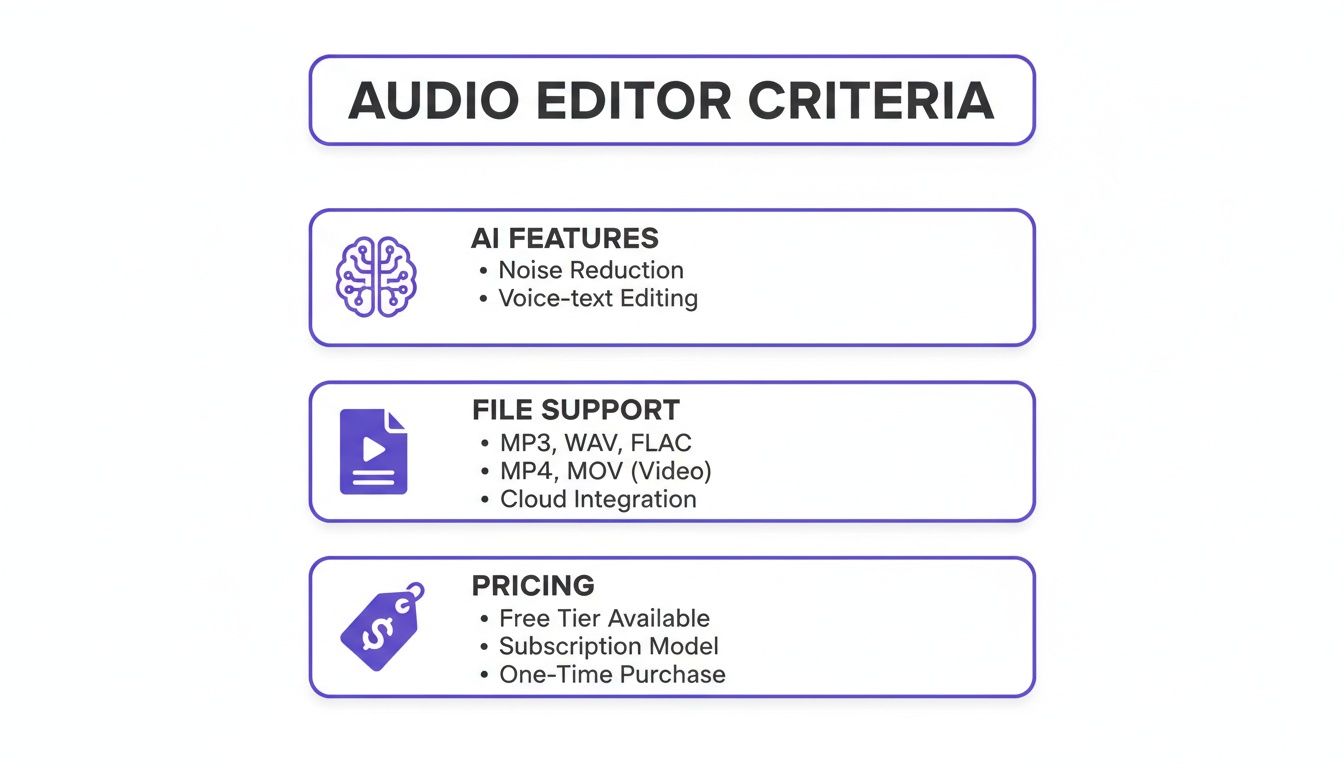
As you can see, the sweet spot is finding a tool that balances powerful AI with flexible file support and a price that makes sense for how often you'll use it.
Feature Deep Dive: SimpleClean vs. Competitors
To make this really practical, let’s get into a direct feature comparison. Here’s a look at how a specialized tool like SimpleClean compares to more generalist platforms on the features that actually matter day-to-day. We're focused on real-world results, not just marketing bullet points.
The table below breaks down how these different philosophies play out in practice.
Feature Deep Dive SimpleClean vs Competitors
| Feature | SimpleClean | Competitor A (Browser DAW) | Competitor B (Video Editor) | Key Takeaway |
|---|---|---|---|---|
| Primary Workflow | Upload-and-process for fast, AI-driven cleanup. | Multi-track timeline editing with manual controls. | Integrated audio tools within a video editing suite. | SimpleClean is built for speed; others offer creative control. |
| Noise Reduction | Specialized AI for deep noise and echo removal. | General noise reduction filter, requires manual tweaking. | Basic "one-click" audio cleanup for video clips. | SimpleClean's AI is more powerful for difficult audio. |
| Video File Handling | Natively processes MP4/MOV files to clean audio directly. | Requires audio extraction before import or has limitations. | Fully integrated, as video is the primary focus. | SimpleClean is ideal for filmmakers who want to clean audio first. |
| Batch Processing | Robust bulk upload and processing for multiple files at once. | Limited or non-existent; designed for single-project work. | Typically processes files individually within a project. | SimpleClean is built for high-volume creators. |
The takeaway here is pretty clear. SimpleClean is purpose-built to do one job exceptionally well: deliver spotless audio with zero friction. Competitors often treat audio cleanup as just another feature in a larger toolkit, which can mean its restoration power isn't nearly as focused or effective. For a closer look at the different methods, check out our guide on noise reduction software for audio.
This market is growing because creators have such different needs. The audio and video editing software market was valued at US$3.5 billion in 2022 and is on track to hit US$4.8 billion by 2026. This growth is being fueled by more than 50 million creators worldwide who all need tools to make their content better, faster.
Pricing and Value Proposition
Finally, let's talk about money. How you pay for a tool says a lot about its intended user. Subscriptions are great for creators on a consistent schedule, like weekly podcasters or YouTubers. You pay a flat monthly fee for a certain number of hours, making your expenses predictable.
On the other hand, pay-as-you-go credits are perfect for freelancers or agencies with unpredictable project flows. You might have a massive project one month and nothing the next. With credits, you only pay for what you use, so you're not burning cash on a subscription you're not using.
Ultimately, the best value isn't just about the lowest price. It's about finding the tool that saves you the most time. An editor that gives you perfect audio in three minutes can be a much better investment than a cheaper one that forces you to spend hours tweaking settings.
Which Online Audio Editor Is Right for You?
Picking the "best" online audio editor isn't about finding the one with the longest feature list. It's about finding the tool that solves your specific problem with the least amount of fuss. The right tool for a podcaster could be completely wrong for a filmmaker.
To help you cut through the noise, I’ve broken things down into four common scenarios every creator faces. Each one presents a unique set of challenges and points you toward an editor that fits your actual day-to-day workflow. This way, we move past generic feature lists and get into practical advice.
For Podcasters Juggling Remote Interviews
If you’re a podcaster, your world revolves around interview quality. The biggest headache? Inconsistent audio from guests calling in from echoey kitchens, noisy offices, or just using a bad microphone. You need a way to make everyone sound like they were in the same room, and you need to do it fast.
Your ideal solution is a tool built around smart AI for echo and reverb removal and, crucially, batch processing. You simply don’t have time to fiddle with each guest’s audio track one by one.
- Your Main Goal: Getting clean, consistent dialogue from multiple people without spending hours in post.
- The Must-Have Feature: Batch processing. You need to be able to throw a folder of audio files at it and let the AI do the heavy lifting.
- My Recommendation: A focused tool like SimpleClean is a lifesaver here. Its AI is trained on exactly these kinds of problems—room echo, background hum, all the classic remote recording gremlins. The ability to upload an entire batch of interviews and just get an email when the clean files are ready is a massive workflow improvement for busy podcasters.
The point of podcasting is to share great conversations, not to become a sound engineer. A tool that automates the cleanup frees you up to work on what actually matters: creating and promoting your content.
For YouTubers Battling the Elements
As a YouTuber, especially if you ever film outside, you know that wind is your worst enemy. It can kill an otherwise perfect take, making your dialogue completely unusable. You need an editor that can rescue that audio without making you jump through a dozen technical hoops.
The priority here is finding a tool that understands video files and has a really good algorithm for killing wind noise.
- Your Main Goal: Saving dialogue that's been buried under wind and other outdoor sounds.
- The Must-Have Feature: Direct support for video files (like MP4 and MOV) and a dedicated, AI-powered wind removal function.
- My Recommendation: Again, a specialized cleanup tool wins. An editor that lets you upload a video file, cleans only the audio track, and then hands you back a new video file with the fixed sound is a huge time-saver. It keeps your video quality intact and saves you from the painful process of detaching, editing, and re-syncing audio and video later.
For Marketers and Educators Creating Voiceovers
When you're producing a commercial or an online course, audio clarity is non-negotiable. Your voiceovers need to sound professional, polished, and totally free of distractions because they often represent the final touch on an important project.
In this situation, simple noise reduction isn't enough. You need true speech enhancement that gives the voice a certain presence and authority.
- Your Main Goal: Creating studio-quality vocal tracks that sound confident and clear.
- The Must-Have Feature: Advanced AI speech enhancement that goes beyond cleaning to actually improve vocal tone and consistency.
- My Recommendation: Look for a tool that specifically advertises "voice" or "speech enhancement." This AI-driven process does more than remove noise; it intelligently balances frequencies and dynamics to add a warmth and richness that makes a voiceover sound like it was recorded in a pro booth. It’s the difference between audio that’s just clean and audio that’s truly compelling.
For Audio Professionals Needing a First Pass
Even experienced audio engineers can get a boost from a smart online tool. Imagine getting a folder with dozens of raw dialogue files for a film or TV show. The initial cleanup—de-noising, de-reverbing, and de-essing every single track—is mind-numbingly tedious work.
Here, an online editor can act as a powerful "first pass" assistant. It handles the bulk of the restoration job before you even pull the files into your main Digital Audio Workstation (DAW).
- Your Main Goal: A quick, reliable way to handle the initial cleanup on a large volume of raw audio.
- The Must-Have Feature: High-quality, transparent AI processing that doesn’t leave artifacts, plus the ability to handle big files.
- My Recommendation: An AI cleaner with a generous file size limit (think 1 GB or more) and a pay-as-you-go pricing model is a perfect fit. This lets you process big batches for a specific project without being locked into a monthly subscription, making it a flexible and efficient addition to a professional workflow.
Making an Audio Editor Part of Your Creative Workflow
The smartest creators I know don't use one tool for everything. They build a workflow, a sort of creative assembly line, where each tool does what it does best. When it comes to audio, this means changing how you think about online editors.
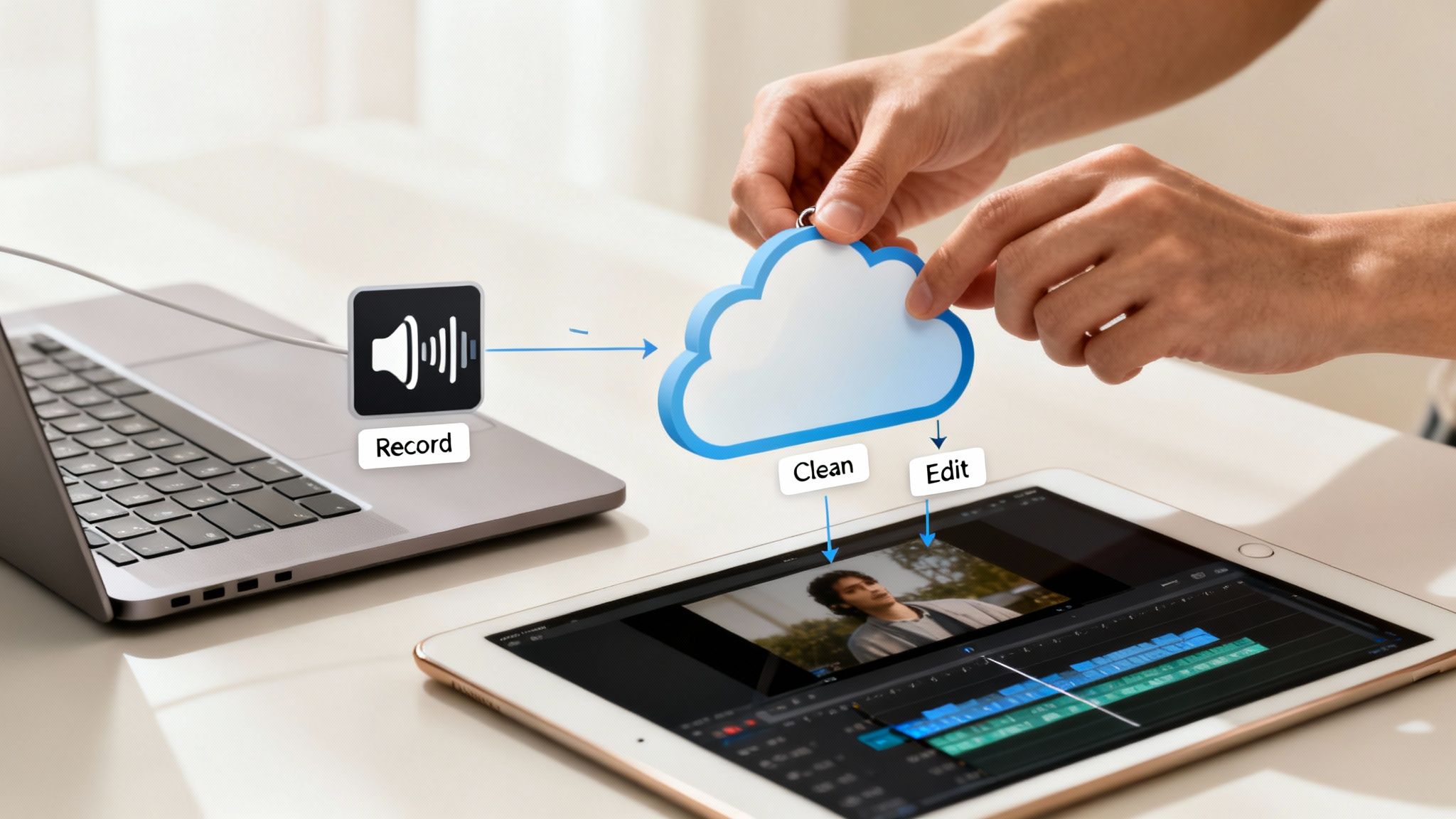
Instead of seeing an online editor as the final step, try thinking of it as the first step. I call this the "cleanup-first" strategy, and it can save you a mountain of time and frustration down the line. It's a simple shift that lets you start every project with a perfect audio foundation, so you can focus on being creative, not a technical fixer.
The Cleanup-First Production Method
This workflow is all about efficiency. It splits the process into two clear phases: the technical cleanup and the creative assembly. This is crucial because it stops you from getting bogged down fixing annoying background hums when you should be editing your content.
Here’s how it works in practice:
- Record Your Content: Just capture your audio or video like you always do. Don't stress too much about minor background noise right now.
- Run it Through an AI Cleaner: Upload that raw file to a dedicated online audio cleaner. Let the AI do the heavy lifting—removing noise, boosting speech clarity, and killing echo.
- Download the Clean File: Grab the processed, studio-quality audio file.
- Start Creating: Now, import that clean track into your main video editor or Digital Audio Workstation (DAW). This is where the fun starts: mixing, adding music, and arranging everything.
Adopting a cleanup-first strategy fundamentally changes your editing mindset. You begin every project from a position of strength, with flawless audio, allowing you to focus entirely on the creative aspects of storytelling and production.
Following this process means you aren't stuck wrestling with bad audio inside a complex video editor, which almost never has robust audio repair tools. If you want to dive deeper, you can learn how to clean up audio online for free in our guide.
Why This Workflow Just Works Better
It really comes down to using the right tool for the right job. A dedicated online audio cleaner is built for one specific purpose: making your audio sound incredible. It can pinpoint and surgically remove unwanted sounds with a level of precision that a general-purpose editor simply can't touch.
For anyone getting into podcasts or other audio-first formats, understanding the essential podcast software and workflows is a game-changer. A cleanup tool slots in perfectly as the pre-editing step before your audio ever hits a full-featured DAW.
The market reflects this need. The digital audio workstation market was valued at $4.39 billion in 2025 and is expected to hit $8.85 billion by 2033. This explosion is driven by creators who need simple, powerful cloud tools for spoken-word audio.
When you start with perfect audio, you're buying back hours of your time that would have been wasted on tedious manual fixes. It frees you up to let your creativity flow without technical roadblocks.
Frequently Asked Questions About Online Audio Editors
Diving into online audio editors can definitely bring up a few questions. Even though these tools are incredibly powerful, it’s smart to wonder about their limits, how they handle your data, and where they really stand against traditional software. Let's clear up some of the most common questions creators have.
My goal here is to give you the confidence you need to pick the right tool. We'll get into the tech behind them and tackle the practical stuff, like workflow and privacy, so you know exactly what you're getting into.
Can an Online Editor Truly Replace Desktop Software?
For a lot of creators, especially those focused on getting clean, crisp dialogue, the answer is a firm "yes." Online editors shine when it comes to specific, high-impact jobs like AI-powered noise removal and voice sweetening. In fact, for these particular tasks, they often run circles around the automated features in a complex Digital Audio Workstation (DAW).
Now, if you're an audio engineer doing heavy multi-track mixing, intricate sound design, or working with a library of specific plugins, you'll still need your desktop software. But for most creators, the main goal is simply pristine speech. An online tool gets you there faster and more efficiently than just about anything else.
The best workflow often involves the best of both worlds. Use a specialized online editor to do the heavy lifting—the initial cleanup—and then pull that perfect audio file into your desktop app for the final creative assembly. You get the specialized power of the AI tool and the creative control of your favorite editor.
How Secure Is My Data with Online Audio Tools?
Any reputable online editor is going to use encrypted connections to protect your files while you're uploading and downloading them. That's standard practice. The real thing to look for, though, is the company's data retention policy. It’s a small detail that says a lot about how much they respect your privacy.
Before you upload sensitive material, take a minute to read the platform's privacy policy. Some services are built for maximum privacy and automatically delete all user files from their servers after a set period, like seven days.
This kind of automatic deletion policy is a huge deal for anyone working with confidential client projects, unreleased content, or anything that needs to be handled carefully. Always look for a service that's upfront and proactive about how it manages your files.
What Is AI Audio Enhancement and How Does It Work?
Think of AI audio enhancement as a highly trained specialist for your sound. It uses complex machine learning models that have been fed a massive diet of audio—countless hours of clean human speech and just as many examples of every kind of noise imaginable.
When you upload a file, the AI listens and intelligently separates the human voice from all the unwanted background junk. This could be anything from traffic and wind to air conditioning hums and room echo. It then strips out the noise while carefully preserving the natural tone and character of the speaker's voice. This is a massive improvement over old-school noise filters, which often left the audio sounding thin, watery, or robotic. AI tools give you a pro-level result without you needing to touch a single dial.
Do I Need Technical Skills to Use an Online Editor?
Not at all—and that’s probably their biggest selling point. The best online editors are designed to be simple and efficient. Unlike traditional software that can have a punishing learning curve, most online tools offer a refreshingly direct workflow.
It usually boils down to three steps:
- Upload your audio or video file.
- Let the AI work its magic automatically.
- Listen to the "before and after" and download the clean version.
There are no confusing settings, intimidating plugins, or complex timelines to figure out. This makes them perfect for creators who are experts in their own fields, not necessarily in audio engineering. The whole point is to get professional sound without the technical headache, so you can focus on creating great content.
When getting started with audio editing, it's helpful to get a handle on the basics, like understanding what an audio clip is in the first place. These simple tools make it easy to work with your sound without getting bogged down in jargon.
Ready to hear the difference AI can make? SimpleClean removes background noise and enhances your voice with a single click. Try it free today and give your content the crystal-clear audio it deserves at https://simpleclean.app.