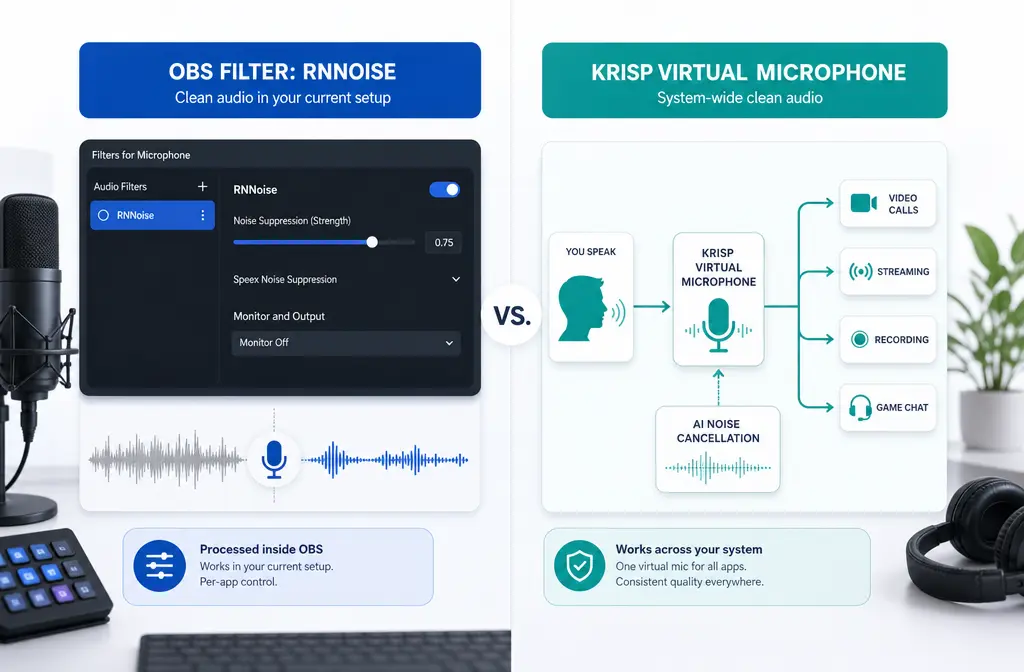
If you record or stream in OBS, the real question is not whether noise suppression exists. It is whether OBS’s free built-in RNNoise is already enough, or whether Krisp is worth adding as a paid system-level layer.
Quick Answer
Pick OBS RNNoise if you mainly work inside OBS, want the free option, and only need help with mild background noise like fan hum or light room noise. OBS’s own documentation positions Noise Suppression for mild background noise, and says RNNoise usually gives higher quality than Speex but uses more CPU.
Pick Krisp if you want noise cancellation before audio reaches OBS, need one cleaner mic feed across multiple apps, or record in a louder and less predictable environment. Krisp works with OBS by choosing Krisp Microphone as your mic source, and Krisp describes itself as a desktop app that processes audio locally on your device.
Pick neither as a miracle fix if your main problem is room echo, severe overlapping noise, or an already-recorded file. In those cases, over-processing live audio often creates metallic artifacts or clipped words. It is usually smarter to export first, then clean noisy recordings with SimpleClean.
This is the short buyer verdict:
- Best free default for OBS-only users: RNNoise
- Best for one mic setup across apps: Krisp
- Best for low budget: RNNoise
- Best for webinars, meetings, and non-OBS apps too: Krisp
- Best for exported files: SimpleClean, not a live suppressor
Krisp vs OBS RNNoise at a glance
| Category | OBS RNNoise | Krisp |
|---|---|---|
| What it is | Built-in OBS Noise Suppression filter | Desktop app with virtual microphone routing |
| Where it works | Inside OBS | System-level workflow across compatible apps, including OBS |
| Price | Free with OBS | Trial/paid plans via official Krisp pricing page |
| Setup friction | Low: add filter on mic source | Medium: install app and select Krisp Microphone in OBS |
| CPU note | OBS says RNNoise uses more CPU than Speex | Adds another app and routing layer; exact CPU use varies |
| Best at | Mild steady background noise in OBS-only workflows | Cross-app suppression and messier live environments |
| Main limitation | OBS says suppression is for mild background noise | Not intended for post-production per Krisp |
| Already recorded files | No | No, not its intended use |

What each tool actually is
OBS RNNoise
RNNoise is one of the Noise Suppression methods built into OBS. OBS also documents Speex as another option, noting that RNNoise generally produces better quality while consuming more CPU. OBS also references an NVIDIA Noise Removal option that requires the NVIDIA Broadcast SDK.
The important practical point: RNNoise is an OBS filter. It helps only when audio passes through OBS. If you also use Zoom, Discord, browser webinar tools, or screen-recording apps outside OBS, RNNoise does nothing there.
Krisp
Krisp is a desktop noise-cancellation app. Its official help documentation explains that you can use it in OBS by selecting Krisp Microphone as the microphone input. Krisp also says processing happens locally on-device. That makes it fundamentally different from RNNoise: Krisp sits earlier in the signal path and can be useful when you want one cleaned-up mic feed across more than one app.
Krisp also states that it is not intended for post-production. So if your recording is already exported and you are trying to rescue a file after the fact, Krisp is the wrong category of tool.
Price and access: free vs paid is a real decision point
OBS RNNoise is easy to score on value: if you already use OBS, it is effectively free.
Krisp is a separate product with a trial/paid structure listed on its official pricing page. Because plan details can change, check the official Krisp pricing page before buying rather than relying on comparison posts that may be outdated.
That means the real cost comparison is:
- RNNoise: no extra subscription, but OBS-only
- Krisp: extra cost, but wider use across apps and devices where supported
If you stream only from OBS in a reasonably controlled room, that extra cost is often hard to justify.
Setup paths: RNNoise is simpler, Krisp is broader
How to set up OBS RNNoise
- In OBS, find your microphone source.
- Open Filters.
- Add a Noise Suppression filter.
- Select RNNoise as the suppression method.
- Test with your normal speaking volume and your usual background noise.
This is the lower-friction option because it stays inside OBS.
How to set up Krisp with OBS
- Install and open Krisp.
- Enable Krisp noise cancellation in the app.
- In OBS, choose Krisp Microphone as your mic input, as Krisp’s help center describes.
- Monitor your voice for cutoffs, robotic tone, or timing issues.
- Disable overlapping suppression elsewhere unless testing proves you need it.
Krisp adds routing, which is both its strength and its inconvenience. You get system-level flexibility, but more points of failure too.
Audio quality tradeoffs: what each fixes well
Both tools are aimed at live noise reduction, not miracle audio restoration.
OBS is explicit that Noise Suppression is meant for mild background noise. That lines up with the best RNNoise use cases:
- PC fan noise
- Light HVAC hum
- Low-level room noise
- Steady background sound under speech
Krisp is usually more attractive when the environment is less controlled:
- Shared spaces
- Remote work calls plus OBS recording
- Occasional keyboard noise or household noise
- Users who want the mic cleaned before it reaches multiple apps
But louder suppression is not automatically better suppression. In both tools, pushing too hard can lead to:
- Metallic or watery speech
- Clipped consonants
- Words disappearing at sentence starts or ends
- An unnatural “underwater” tone
If you are deciding purely on sound, RNNoise is often the smarter first test for mild steady noise, while Krisp is the more compelling option for chaotic real-world use across apps.
Performance tradeoffs: CPU, routing, and stability
Here the official facts are more limited, so the cleanest way to frame it is:
- OBS says RNNoise uses more CPU than Speex.
- Krisp adds another application and virtual-mic routing layer.
That means your practical tradeoff is not just raw CPU. It is also workflow complexity.
RNNoise may be the better choice if:
- You want fewer moving parts
- Your PC is already stable in OBS
- You do not need noise reduction anywhere else
Krisp may be worth it if:
- You jump between OBS, calls, webinars, and screen recorders
- You want consistent mic cleanup outside OBS
- You are comfortable troubleshooting audio routing

Best use cases: which one should you choose?
| Scenario | Better pick | Why |
|---|---|---|
| Gaming stream in OBS on a budget | OBS RNNoise | Free, simple, and good enough for mild steady noise |
| Course recording in a quiet room | OBS RNNoise | Low friction and no extra subscription |
| Webinars across multiple apps | Krisp | System-level workflow is more flexible than an OBS-only filter |
| Remote presenter in a noisier home environment | Krisp | Useful when you want cleanup before audio reaches OBS or meeting apps |
| Keyboard noise while talking | Depends; test both lightly | Neither is guaranteed to remove every key click cleanly without artifacts |
| Untreated echoey room | Neither | Noise suppression is not true room treatment or perfect dereverb |
| Already-recorded video or podcast | Neither | Use file cleanup instead of live suppression |
What neither tool fixes well
This is where many comparison articles oversell live suppression.
Neither RNNoise nor Krisp should be treated as a perfect solution for:
- Room echo or reverb
- Very loud overlapping background voices
- Severe clipping or distortion already in the recording
- Files that are already recorded and exported
OBS’s own docs frame suppression around mild noise, and Krisp explicitly says its app is not intended for post-production. So if your voice and noise are heavily tangled together, or your room sound is the main issue, you will usually get better results by fixing the room, improving mic placement, or processing the exported file afterward.
That is the point where SimpleClean makes more sense: use live suppression conservatively, then clean the final recording instead of stacking aggressive filters during capture.
Should you use Krisp and OBS suppression together?
Usually, not by default.
Stacking Krisp with aggressive OBS suppression can create double-processing problems:
- cut-off word endings
- robotic tone
- pumping or swishing artifacts
- inconsistent volume and presence
If you want to experiment, start with one main suppressor first. Add a second layer only if a short test recording proves it improves your real-world audio instead of damaging it.
A safer OBS chain is often:
- Primary suppression: either Krisp or RNNoise
- Light dynamics control after that if needed
- A gate or expander only for idle-room noise, not as your main cleanup tool
OBS’s documentation is useful here: a Noise Gate only closes when you are not speaking, so it does not remove noise underneath your voice. An Expander can be gentler than a hard gate, but it still is not the same thing as true live suppression.
Troubleshooting common problems
Words are getting clipped
- Reduce suppression strength or simplify your filter chain.
- Do not stack Krisp and aggressive RNNoise unless you have tested carefully.
- Check gates and expanders, since they may be trimming speech starts.
Your voice sounds metallic or underwater
- Back off the suppression.
- Use only one main suppressor at a time.
- Re-test mic distance and input gain before blaming the algorithm.
Keyboard noise is still leaking through
- Neither Krisp nor RNNoise can guarantee perfect key-click removal during speech.
- Move the mic closer to your mouth and farther from the keyboard.
- Lower desk vibration and consider quieter switches or placement changes.
- For deeper keyboard-noise fixes, see OBS mic picking up keyboard.
You have echo, not just noise
- Noise suppression is not a full dereverb solution.
- Add soft furnishings, reduce room reflections, and improve mic placement.
- For more on that limitation, see how to remove echo in Audacity.
You need the same cleaned mic in more than OBS
- This is Krisp’s clearest advantage over RNNoise.
- If you also present in meeting tools or record tutorials elsewhere, Krisp may justify its cost.
When to export first and clean the file instead
If your priority is the final video or podcast quality rather than live-only monitoring, a file-cleanup pass is often the better workflow.
Export first and then use remove background noise from recordings with SimpleClean when:
- noise overlaps your speech heavily
- the room is echoey and live suppression is making things worse
- you already finished recording
- you want to avoid aggressive live artifacts in the master file
After cleanup, you can add accessibility and distribution tools around that recording too. For example, Best AI Captions can add captions and subtitles, Translate Dub can translate and dub videos for multilingual audiences, and Mallary.ai can help schedule and distribute the finished content across social platforms.
Final verdict
OBS RNNoise is the best default for most budget-conscious OBS creators. It is free, built in, and a strong first step for mild background noise.
Krisp is worth considering when your workflow is bigger than OBS. If you need one cleaned-up mic across meetings, webinars, tutorials, and live presentations, the extra routing can be worth it.
Neither is the right answer for every noise problem. Echo, severe overlapping noise, and already-recorded files are where live suppression often stops being the best tool. In those cases, the smarter move is to keep live processing light and clean exported audio with SimpleClean afterward.
How to choose in 5 steps
- Define your workflow. If you only care about OBS, start with RNNoise. If you need cleanup across multiple apps, consider Krisp.
- Check your room. Mild steady noise favors RNNoise. Louder, less predictable noise may justify Krisp.
- Consider your budget. RNNoise is free; Krisp adds ongoing cost.
- Test one suppressor at a time. Avoid stacking by default.
- If the final file still sounds rough, clean the export. That is the point to use a file-based workflow instead of forcing more live suppression.
FAQs
Is Krisp better than OBS noise suppression?
Not universally. RNNoise is often the better value for OBS-only users with mild noise. Krisp is more appealing when you want one suppression layer across multiple apps or a noisier real-world setup.
Does RNNoise use more CPU than Krisp?
The official OBS documentation specifically says RNNoise uses more CPU than Speex. The provided sources do not give an official direct RNNoise-versus-Krisp CPU benchmark, so the safer comparison is that Krisp adds a separate app and routing layer while RNNoise runs as an OBS filter.
Can Krisp work with OBS Studio?
Yes. Krisp’s official setup guide says to select Krisp Microphone in OBS.
Is OBS RNNoise free?
Yes. It is built into OBS as a noise suppression method.
What is better for keyboard noise: Krisp or RNNoise?
It depends on how loud and close the keyboard is, and whether the clicks overlap your speech. Neither is guaranteed to remove all keyboard noise cleanly. Test both lightly, and also improve mic placement.
Can either tool remove room echo?
Not reliably as a full fix. These tools are for noise suppression, not perfect dereverb or acoustic treatment.
Should I use Krisp and OBS suppression together?
Usually only after testing. Double-processing can cause artifacts and clipped words.
Can Krisp clean an already recorded file?
Krisp’s official documentation says it is not intended for post-production, so it is not the right tool for already-recorded file cleanup.
Sources and further reading
- OBS Noise Suppression Filter - Official source for RNNoise, Speex, NVIDIA option, and the mild-background-noise positioning.
- OBS Filters Guide - Official source for filter roles including Expander and general troubleshooting context.
- OBS Noise Gate Filter - Official support for the point that a gate only cuts noise when you are not talking.
- Set up OBS Studio with Krisp - Official Krisp documentation for selecting Krisp Microphone in OBS on supported systems.
- What is Krisp? - Official source for Krisp being a desktop app, local on-device processing, and not intended for post-production.
- OBS Noise Suppression: How to Remove Background Noise (2026 Guide) - Current SERP competitor that frames creator comparison topics readers may already have seen.
- Real-Time Noise Suppression In Production — Krisp, RNNoise, And DeepFilterNet - Neutral context on the real-time noise suppression category.