How to Remove Background Noise in Podcastle: Magic Dust vs Noise Reduction, What Not to Stack, and When to Clean the Exported File Online
Quick Answer
Yes, Podcastle can remove background noise well for spoken-word audio, especially when the noise is steady and moderate, like hiss, fan noise, HVAC, or light room noise. Podcastle offers two relevant cleanup options: Magic Dust and the standalone Noise Reduction tool.
For most voice recordings, the key decision is simple:
- Use Magic Dust when you want one-click voice polish and broader AI cleanup.
- Use Noise Reduction when you want lighter, more targeted noise cleanup on a clip.
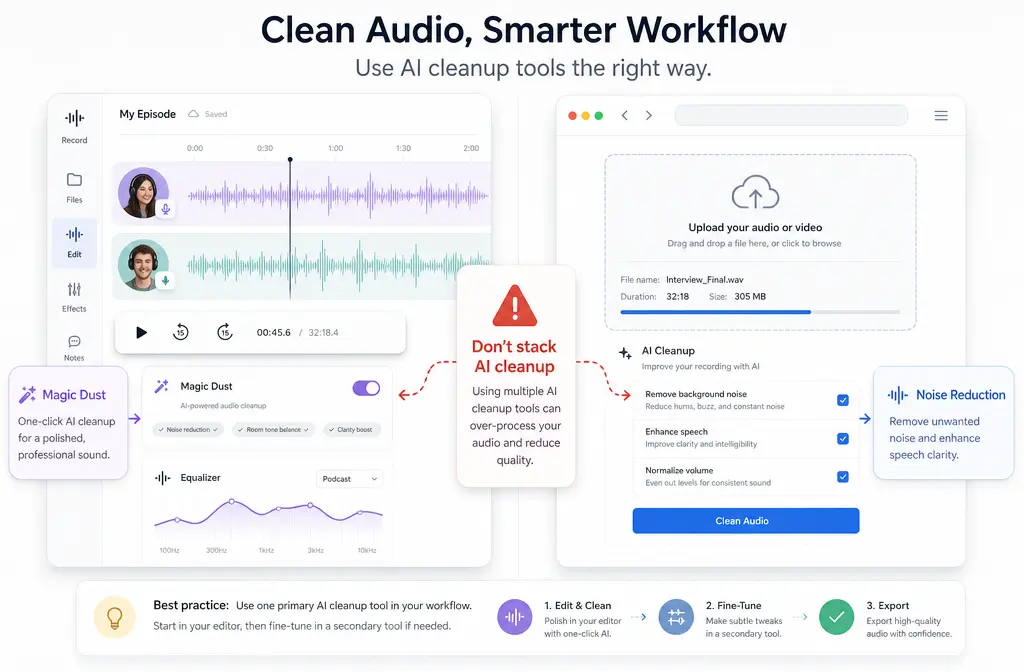
- Do not stack them on the same clip unless you have a very specific reason to experiment, because Podcastle’s help documentation warns that Magic Dust already includes AI cleanup functions such as Noise Reduction, Auto-Leveling, and Silence Removal, and adding more AI Assistant tools on top can distort the result.
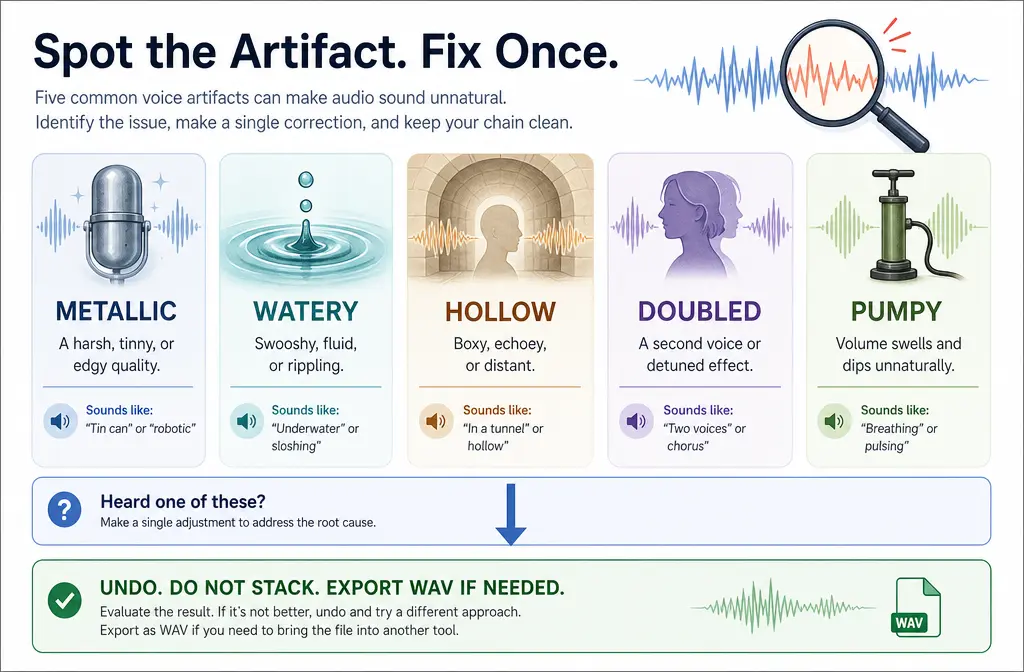
If your voice starts sounding metallic, watery, hollow, doubled, or pumpy, stop processing. In many cases, it is faster to export the file and clean podcast audio with SimpleClean separately rather than keep stacking fixes inside the project.
Does Podcastle Have Noise Reduction?
Yes. Based on Podcastle’s help center and product pages, Podcastle has both:
- Magic Dust, an AI enhancement tool for spoken audio and video voice tracks
- Noise Reduction, a standalone tool for reducing background noise on a selected clip
This matters because many articles blur the two together, but they are not the same workflow.
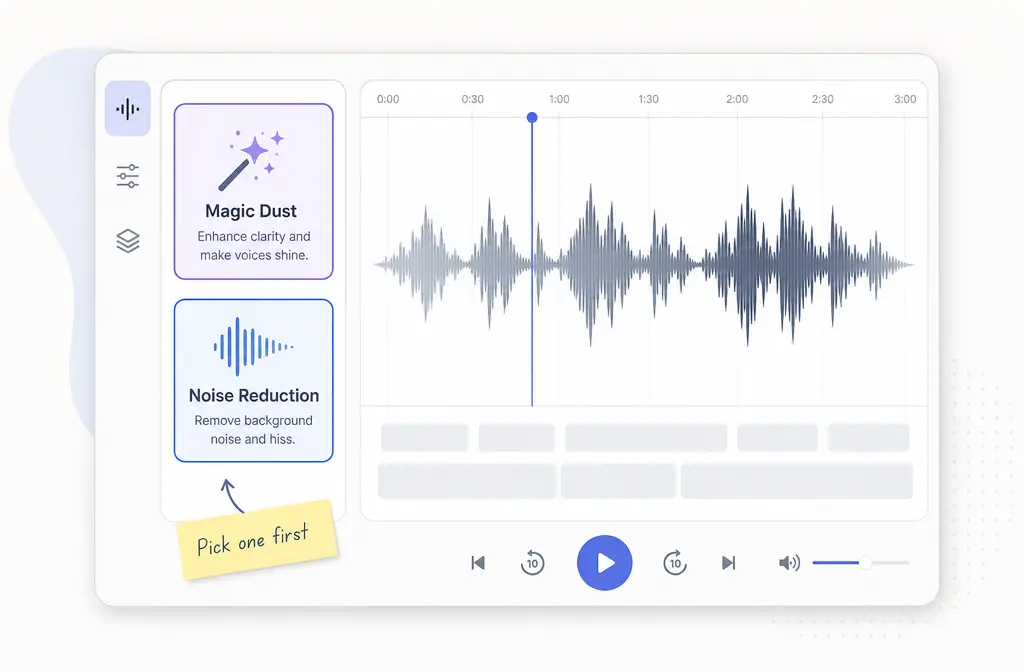
Magic Dust vs Noise Reduction in Podcastle
| Tool | Best for | What it does | Main caution |
|---|---|---|---|
| Magic Dust | One-click speech polish | Podcastle describes it as a broader AI enhancement workflow for voice that includes functions such as Noise Reduction, Auto-Leveling, and Silence Removal | Do not pile more AI Assistant cleanup tools on top of it unless you are willing to risk artifacts |
| Noise Reduction | Lighter, targeted background noise cleanup | Reduces unwanted background noise on a selected clip | Less useful if the recording problem is really echo, clipping, wind blasts, or overlapping voices |
Best rule for most users: pick one first, listen, and only continue if the voice still sounds natural.
Simple starting point: If the clip is mainly speech and just needs quick cleanup, start with Magic Dust. If the recording already sounds decent and only has a layer of steady noise underneath, start with Noise Reduction.
What Each Podcastle Tool Is Good At
Based on the supplied research brief and Podcastle’s own positioning, Podcastle is a strong first stop for spoken-word cleanup, not every possible audio repair problem.
Best use cases for Podcastle
- Steady hiss
- Fan or HVAC noise
- Light room noise
- Uneven voice presence or level, especially when using Magic Dust
- Speech tracks in podcasts, interviews, talking-head videos, courses, and marketing content
Weak use cases for Podcastle
- Strong room echo or reverb
- Heavy wind
- Clipping or distortion
- Overlapping voices
- Loud music under speech
- Music-heavy or instrument-focused material
That last point is important: Podcastle’s help center says Magic Dust is not recommended for music tracks or complex instrumental arrangements. So if your project is a song, a soundtrack-led video, or speech mixed aggressively with music, be cautious about expecting voice-first AI cleanup to behave well.
Should You Use Magic Dust and Noise Reduction Together?
Usually, no.
This is the biggest practical mistake to avoid in Podcastle. According to Podcastle’s help documentation, Magic Dust already includes cleanup functions such as Noise Reduction, Auto-Leveling, and Silence Removal. That means stacking more AI Assistant tools onto the same clip can overprocess the sound.
What not to stack on the same clip:
- Magic Dust + Noise Reduction
- Magic Dust + Auto-Leveling
- Magic Dust + Silence Removal
- Magic Dust + multiple follow-up AI passes just because the first pass was not perfect
If the first result is not good, the better move is often to undo, switch tools, or export the file for separate cleanup instead of doubling down.
How to Remove Background Noise in Podcastle for Audio Clips
- Open your Podcastle project and import or locate the audio clip you want to clean.
- Select the clip in the editor.
- Choose your first cleanup path:
- If you want broader one-click speech enhancement, apply Magic Dust.
- If you mainly want background noise reduced without broader AI polish, apply Noise Reduction.
- Let Podcastle process the clip.
- Listen critically to the result, especially on words with s, f, t, and breath sounds.
- Check for artifacts such as metallic, watery, hollow, doubled, or pumpy voice tone.
- If the voice sounds natural, keep it.
- If the voice sounds overprocessed, undo the effect and try the other tool instead of stacking another AI cleanup pass on top.
That “listen before adding more” step is the difference between clean dialogue and the familiar AI-denoise sound that makes speech feel fake.
How to Remove Background Noise in Podcastle for Video Audio
Podcastle also lets you clean the audio attached to video clips. The workflow is similar:
- Open the video project in Podcastle.
- Select the video clip whose audio needs cleanup.
- Apply Magic Dust if the goal is broad spoken-voice enhancement on the clip’s audio.
- Or apply Noise Reduction if the issue is mainly background noise and you want a lighter touch.
- Preview the processed clip and listen for voice artifacts, not just quieter noise.
- Avoid stacking extra AI cleanup tools onto the same clip after Magic Dust.
- Export the finished video if the result sounds natural.
If you are cleaning a talking-head video for social or YouTube, this can be enough. If you also need subtitles after cleanup, Best AI Captions can help add captions and subtitles to the finished video. If you plan to repurpose the cleaned video for multilingual audiences, Translate Dub fits naturally after the audio cleanup stage.
Best-For Recommendations
- Best for quick podcast voice polish: Magic Dust
- Best for lighter noise-only cleanup: Noise Reduction
- Best for steady hiss, fan, HVAC, and light room noise: Either tool, but choose one first and compare
- Best for uneven spoken-word level: Magic Dust
- Best for echo-heavy rooms, clipped audio, or wind damage: Export and use a separate cleanup workflow
- Best for music-heavy material: Avoid relying on Magic Dust as a catch-all fix
Artifact Troubleshooting: Metallic, Watery, Hollow, Doubled, or Pumpy Voice
If Podcastle makes your voice sound worse, the problem is usually overprocessing, not that you failed to add enough tools.
Metallic or watery voice
- Often happens when noise suppression is pushed too far for the quality of the source
- More likely if you stacked Magic Dust with other AI cleanup tools
- Best fix: undo, go back to the cleaner of the two versions, and use only one main cleanup pass
Hollow voice
- Can happen when room tone is removed unevenly and the voice loses body
- More common on echoey recordings
- Best fix: avoid extra processing and consider exporting the file for separate speech-first cleanup
Doubled or phasey voice
- Can show up when the algorithm struggles with reflections, overlap, or unstable background sound
- Best fix: revert to a simpler pass or clean the exported file outside the editing stack
Pumpy voice
- Usually means the noise floor is rising and falling unnaturally around speech
- Often triggered by challenging noise or too much automated processing
- Best fix: choose one tool only and stop if the noise reduction starts breathing around phrases
Good rule: If the cleaned version is quieter but the voice is less believable, it is not actually a better edit.
When Podcastle Works Well, and When It Doesn’t
| Noise or problem | How Podcastle is likely to do | Recommended move |
|---|---|---|
| Steady hiss | Usually good | Start with Noise Reduction or Magic Dust, then compare |
| Fan or HVAC | Usually good if moderate | Use one cleanup pass and listen for artifacts |
| Light room noise | Usually good | Magic Dust is often the faster option for voice-first projects |
| Uneven voice level | Good fit for Magic Dust | Use Magic Dust alone first |
| Strong echo or reverb | Weak | Do not keep stacking AI tools; export and clean separately |
| Heavy wind | Weak | Export and use a dedicated cleanup pass |
| Clipping/distortion | Weak | Noise tools are not the right fix |
| Overlapping voices | Weak | Expect limited improvement |
| Loud music under speech | Weak | Be cautious; Magic Dust is not recommended for music-heavy material |
When to Export the File and Clean It Separately Online
You should stop editing inside Podcastle and move to a separate cleanup workflow when:
- You already tried one pass and the voice turned metallic or watery
- The room echo is more distracting than the background hiss
- The recording has wind, clipping, or other damage that simple denoise will not really fix
- You are tempted to stack Magic Dust, Noise Reduction, Auto-Leveling, and Silence Removal on the same clip
- The project is speech-first, and you care more about natural voice tone than about keeping everything inside one editor
That is where SimpleClean makes sense as a fallback workflow. Instead of forcing more processing in the timeline, you export the file, clean the actual rendered audio, then continue with your final edit or delivery.
Best Export Workflow from Podcastle
For speech-first cleanup, export WAV when possible. A WAV export is the better handoff when your main goal is preserving voice quality during another cleanup step.
Choose MP4 instead if video delivery matters more and you want to clean the audio associated with the finished video workflow.
- Pick WAV for podcasts, interviews, webinars, voiceovers, and course narration where audio quality comes first
- Pick MP4 for social video, YouTube delivery, and talking-head content where the final asset needs to stay in video form
After export, you can remove background noise from exported Podcastle audio without continuing to stack tools on the same project clip.
A Practical Fallback Workflow
- Try one Podcastle cleanup tool on the clip: Magic Dust or Noise Reduction.
- Listen carefully for artifacts.
- If the voice is cleaner and still natural, finish the edit in Podcastle.
- If the voice becomes metallic, hollow, watery, doubled, or pumpy, undo the pass.
- Export the clip or project, ideally as WAV for speech-first work.
- Use a separate cleanup workflow to fix the exported file instead of stacking more AI repair inside the timeline.
- Bring the cleaned file back into your content workflow if needed.
If the cleaned episode or video is headed to multiple channels, this is also a good point to think beyond editing. After cleanup, captions can be added with Best AI Captions, multilingual versions can be created with Translate Dub, and scheduled distribution across social platforms can be handled with Mallary.ai if you are repurposing clips, trailers, or educational snippets at scale.
Final Take
Podcastle is a very reasonable first stop for spoken-word noise cleanup. Its biggest strength is speed: you can select a clip, apply Magic Dust or Noise Reduction, and often get a usable improvement quickly.
Its biggest trap is also speed: because the tools are easy to apply, it is tempting to stack them when the first result is not perfect. That is usually where artifacts begin.
If you remember only one thing, make it this: choose Magic Dust or Noise Reduction first, not both by default. If the voice starts sounding artificial, export the file and switch to a separate cleanup path instead of forcing more processing in Podcastle.
For adjacent workflows, you may also find these guides useful: remove background noise in Descript, remove background noise in Riverside, and clean podcast audio online.
FAQs
Can Podcastle remove echo or reverb?
It may help a little in some voice recordings, but strong echo or reverb is one of Podcastle’s weaker use cases based on the supplied research brief. If the room sound is severe, avoid stacking more AI tools and consider exporting the file for separate cleanup.
Can Podcastle fix bad phone or video recordings?
Sometimes, yes, if the main issue is moderate background noise on spoken voice. If the recording also has clipping, heavy wind, or strong room reflections, the result may still sound unnatural after processing.
Can Podcastle clean music?
Be careful here. Podcastle’s help center says Magic Dust is not recommended for music tracks or complex instrumental arrangements. It is better framed as a spoken-word cleanup tool.
Can Podcastle clean background noise from video too?
Yes. Podcastle supports applying its cleanup tools to the audio in video clips as well as standard audio clips, following a similar clip-based workflow.
What’s the difference between Magic Dust and Noise Reduction in Podcastle?
Magic Dust is the broader one-click AI voice enhancement workflow, while Noise Reduction is the more targeted standalone noise cleanup tool. Most users should choose one first instead of stacking both.
Why does Podcastle make my voice sound metallic or watery?
That usually means the speech has been overprocessed, often because the source was challenging or because too many cleanup tools were stacked on the same clip. Undo the pass, try a simpler approach, or export the file for separate cleanup.
When should I export from Podcastle and use a separate audio cleaner?
Export when one pass already sounds artificial, when the issue is echo, wind, clipping, overlap, or music-heavy material, or when you are considering stacking Magic Dust with more AI cleanup tools just to chase a better result.
Sources and further reading
- What’s Magic Dust AI, and how do I use it? - Primary source for Magic Dust, voice-focused usage, and the warning not to combine with other AI Assistant tools.
- What is Noise Reduction and how do I use it? - Primary source for the standalone Noise Reduction feature and clip-level workflow.
- How to Remove Background Noise From Audio in Just 3 Steps - Official Podcastle blog article covering general background-noise removal workflow.
- AI Noise Reducer | Clean up Audio Instantly with AI - Supports Podcastle’s product positioning and terminology around AI noise cleanup.
- How to Improve Audio Quality in Just 3 Simple Steps - Supports explanation of Podcastle’s AI audio enhancement workflow.
- Generative AI removing background noise from recordings is just one of the new tools for podcasters - Independent coverage confirming Magic Dust’s launch and positioning as an AI enhancement tool.
- Podcastle Review (2026): Best Podcast Editor for Chromebook? - Independent reviewer perspective for nuance on real-world Magic Dust performance and limits.