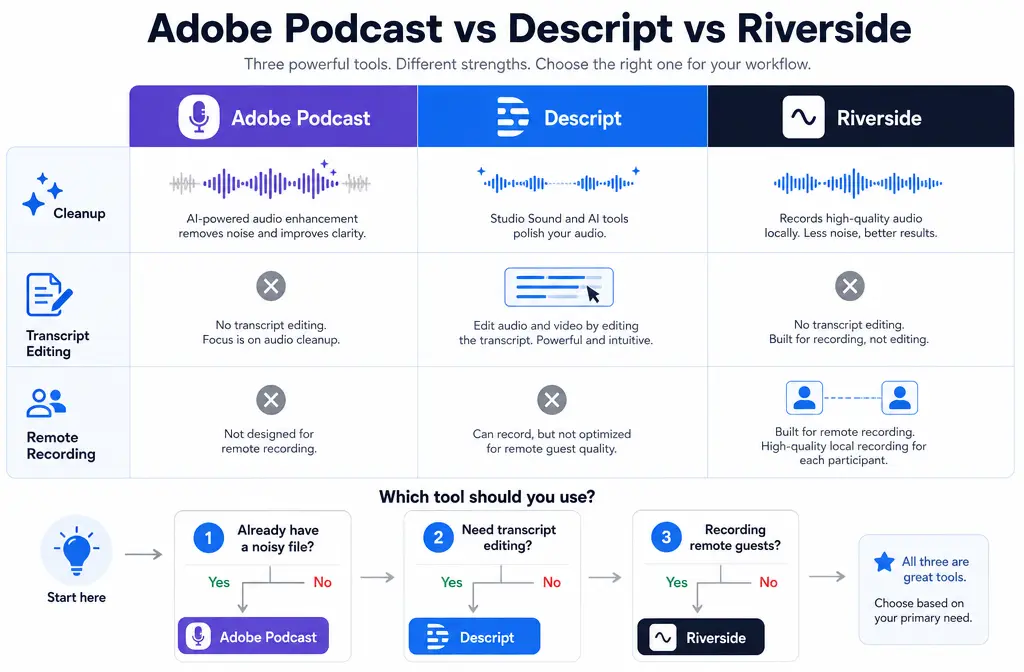
Quick Answer
If you already have a noisy WAV, M4A, or exported MP4 and your main job is cleaning spoken audio fast, Adobe Podcast is usually the strongest fit. If your workflow depends on editing by transcript, Descript is the better choice. If you have not recorded yet and need to capture remote guests on separate local tracks, Riverside is the best starting point.
The easiest way to avoid picking the wrong tool is to separate three different jobs:
- Post-production cleanup: Adobe Podcast
- Transcript-led editing plus cleanup: Descript
- Remote recording with separate local tracks: Riverside
If you already exported the final file and do not want to move the whole project into a new editor, SimpleClean is the practical fallback for cleaning exported speech audio without changing your recording or editing stack.
| Need | Best fit | Why |
|---|---|---|
| One-off cleanup of a noisy speech file | Adobe Podcast | Built around Enhance Speech for spoken-word post-processing |
| Edit by transcript | Descript | Studio Sound sits inside a transcript-first editor |
| Record remote interviews | Riverside | Records local separate tracks and exports WAV tracks for external editing |
| Clean an exported MP4 after editing | Adobe Podcast or clean exported video audio with SimpleClean | Best when the recording is already finished and you just need the noise reduced |
| Fix one guest more than another | Riverside | Separate speaker tracks give you more control than a single mixed file |
What each tool actually is
This comparison gets clearer once you stop treating all three as the same kind of product.
Adobe Podcast
Adobe Podcast is mainly a post-production speech enhancer. Its official FAQ describes Enhance Speech as a tool that improves spoken audio quality, but Adobe also notes that results depend on the source and can be limited by very noisy input or poor recording conditions. On the plans page, Adobe shows that the free plan has important limits: audio only, no bulk upload, no strength control, a 30-minute max duration, and 1 hour per day of enhancement. Premium adds video support, bulk upload, strength controls, and higher usage caps.
Descript
Descript is primarily an editor, especially for people who want to cut spoken content by transcript. Its Studio Sound feature reduces background noise and echo, and Descript says it applies at the file level. That matters: if only one section of a file needs cleanup, you may need to duplicate or flatten part of the timeline rather than assuming Studio Sound is naturally clip-by-clip. Descript also offers an intensity control, which is useful when you want less aggressive processing.
Riverside
Riverside is first a recording platform. Its core advantage is not “best denoiser.” It is that Riverside records local separate tracks for each participant and lets you export WAV tracks for external editing. Riverside also provides Magic Audio, but the official docs make it clear that Riverside’s real workflow advantage is the separate-track recording model and the ability to export raw, aligned, and processed track options depending on your workflow.
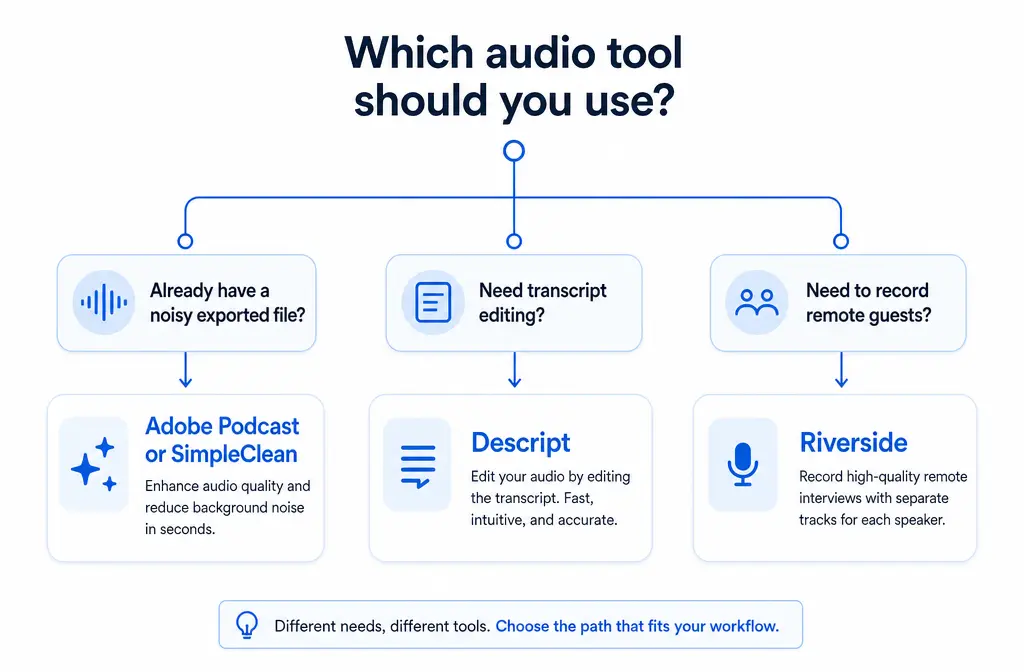
Fast verdict: best by job to be done
Best for cleaning a single noisy file: Adobe Podcast
Choose Adobe Podcast if your situation is: “I already have the file. I just want the voice cleaner.” That is especially true for:
- podcast guest tracks already recorded elsewhere
- webinar replays
- screen recordings with fan noise
- talking-head videos with room echo
- voiceovers exported from another editor
It is the simplest fit when cleanup is the main task.
Best for transcript editing: Descript
Choose Descript if cleanup is only one part of the job and you also need to:
- edit by transcript
- remove filler and tighten spoken content
- restructure interviews fast
- produce social clips from a transcript-led workflow
Descript is strongest when the editing interface matters as much as the sound cleanup.
Best for remote guest recording: Riverside
Choose Riverside if you have not recorded yet and want the cleanest workflow for remote interviews. Its local recording model matters because separate source tracks are easier to salvage than a single mixed call recording. If one guest has keyboard noise and the host sounds fine, you can treat those tracks differently later.
Best for an exported MP4 with bad audio: Adobe Podcast or SimpleClean
If the video is already exported, the decision is less about transcript editing or recording and more about how quickly you can fix the final file. Adobe Premium supports video enhancement, while the Adobe free plan is audio-only. If you do not want to re-open the whole project in another editor, you can clean noisy speech recordings with SimpleClean and keep your existing workflow intact.
Best for separate speaker cleanup: Riverside
When you can access separate WAV tracks, Riverside becomes the best starting point because the main advantage is control, not automatic polish. Cleaning each speaker separately usually works better than trying to rescue a single mixed file after the fact.
Adobe Podcast vs Descript vs Riverside: strengths and limits for audio cleanup
| Area | Adobe Podcast | Descript | Riverside |
|---|---|---|---|
| Background noise reduction | Strong fit for spoken-file cleanup | Built into Studio Sound | Available through Magic Audio, but not the main reason to choose it |
| Echo reduction | Can help, but source quality still matters | Officially designed to reduce echo as well as noise | Better to avoid the problem by recording good local tracks in the first place |
| Editing workflow | Not the main editing hub | Best of the three for transcript-based editing | Good recording-to-edit pipeline, but recording is the core strength |
| Video cleanup | Premium supports video | Useful if the project already lives in Descript | More relevant before export than after export |
| Separate tracks | Not the key use case | Depends on what you import | Major advantage; local separate-track recording and WAV exports |
| Artifact risk if overprocessed | Yes | Yes, especially if pushed too hard or source is very poor | Yes, and stacking processing later can make it worse |
All three tools can produce unnatural speech if the source is rough enough or the enhancement is pushed too hard. Adobe’s FAQ and Descript’s help both point back to the same reality: AI cleanup works best when the original recording is still understandable.
Background noise
For fans, HVAC, light room noise, and general speech cleanup, Adobe Podcast and Descript are the more direct choices. Riverside is not where you go primarily for denoising a finished file.
Echo and bad rooms
Descript explicitly says Studio Sound reduces echo. Adobe can also improve spoken audio, but neither tool turns a severe reverb problem into a perfect studio recording every time. Very echoey rooms, speaker playback bleeding into the mic, and aggressive background sound can still cause artifacts.
Music and ambience
This comparison is for spoken-word cleanup, not music restoration. If the file contains heavy music, ambience, or mixed production sound, speech enhancers may remove too much or make the result sound unnatural. These tools are at their best on clear spoken voice that simply needs cleanup.
Long files and file-level behavior
This is where workflow details matter:
- Adobe’s free plan has a 30-minute max duration per enhancement and 1 hour/day.
- Descript says Studio Sound is a file-level effect and notes that very noisy audio or long files can cause issues.
- Riverside is strongest when you export the underlying tracks and handle cleanup strategically instead of expecting one-click repair on a finished mix.
Pricing and plan limits that actually affect your decision
For this comparison, the most important “pricing” details are really workflow limits.
Adobe Podcast limits that matter
- Free plan: audio only
- Free plan: no bulk upload
- Free plan: no strength control
- Free plan: 30-minute max duration
- Free plan: 1 hour/day of enhancement
- Premium: adds video support, bulk upload, strength controls, and higher caps
That means Adobe free is great for testing or occasional audio cleanup, but less ideal if you need to process long webinars, video files, or a batch of exports.
Descript limits that matter
- Studio Sound availability varies by plan
- File-length limits apply by plan/workflow
- Because Studio Sound is file-level, selective cleanup can require extra editing steps
If transcript editing is the reason you are buying, those limits may still be acceptable. If you only want one-click speech cleanup, the editor overhead may feel unnecessary.
Riverside limits that matter
- Magic Audio is included on paid tiers
- Separate-track access and export flexibility are key buying points
- Track download/export options affect whether you can finish in another tool
Before subscribing, confirm the current plan you need for separate-track exports and your preferred post-production workflow on Riverside’s pricing and help pages.
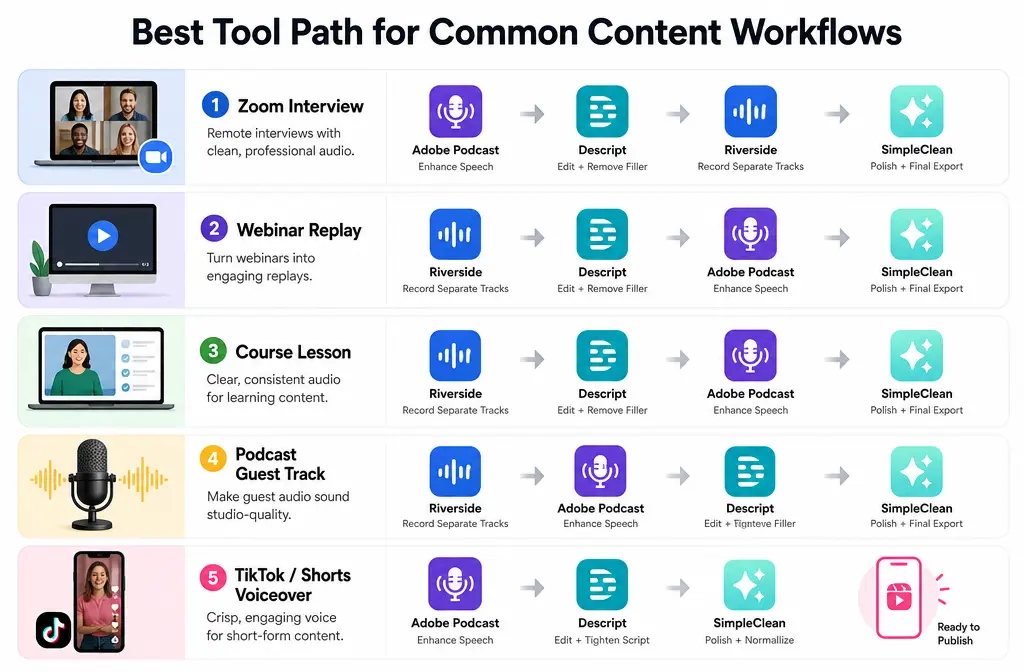
Real workflow examples
1) Zoom interview with one noisy guest
If the interview is already recorded as one mixed file, start with Adobe Podcast or remove interview noise from an exported file. If you recorded separate participant files, cleaning the weak track separately usually gives you a better result. For more on source-track strategy, see our guide to removing background noise in Zoom.
2) Webinar replay with light echo
If you are mainly trimming and republishing the webinar, Descript can make sense because you can clean the speech and edit by transcript in one place. If the webinar has already been exported and you only need the voice cleaned up, Adobe Podcast or a direct exported-file tool is usually faster.
3) Course lesson or screen recording
For a single teacher voice with fan noise or room tone, Adobe Podcast is often the cleanest decision. If the lesson is already rendered as MP4 and you want the quickest fix without moving projects around, use a file-first workflow.
4) Podcast with remote guests
If you have not recorded yet, Riverside is the best first choice because local separate tracks give you the most salvage room later. You can then export WAV tracks and finish the edit elsewhere if needed.
5) TikTok, Reels, or Shorts voiceover
For short spoken clips, the winning workflow is usually: clean the voice first, then caption and repurpose it. After cleanup, Best AI Captions can help add subtitles, and Translate Dub is a natural next step if you want multilingual dubbed versions for global audiences.
How to choose in 5 steps
- Decide whether your problem is recording, editing, or cleanup.
If you still need to record remote guests, start with Riverside. If the file already exists, skip recorder-first tools unless you truly need their editor. - Ask whether transcript editing is central.
If yes, Descript deserves the short list. If no, a simpler cleanup-first workflow may be faster. - Check whether you have one mixed file or separate tracks.
Separate tracks usually win for guest audio problems. Mixed files are more limiting. - Match the file type to the plan limits.
Adobe free is audio-only and capped at 30 minutes per enhancement. If you need video support, strength controls, or higher caps, that changes the value equation. - Avoid stacking enhancers unless you have tested lightly.
Running one AI speech enhancer after another is a common way to get metallic, watery, or robotic voice.
When not to stack AI cleanup tools
If you run Adobe Podcast, then Studio Sound, then another denoiser, you are often asking each tool to “fix” artifacts created by the last one. That is how voices end up sounding metallic or phasey.
A safer workflow is:
- start with the cleanest source you have
- apply one main speech cleanup tool
- listen before adding anything else
- only do extra processing if a specific problem remains
If your voice already sounds robotic after denoising, read our guide on how to fix metallic voice after noise reduction.
When SimpleClean is the better fallback
Many people comparing Adobe Podcast vs Descript vs Riverside are actually trying to solve a narrower problem: “I already exported the file. I just need the speech cleaned up.”
That is where SimpleClean fits naturally:
- you already finished editing in another app
- you do not want to migrate the project into a new editor
- you have an exported MP4, WAV, or similar speech recording
- you want a faster cleanup step instead of changing your whole stack
It is not a replacement for Riverside’s local recording model or Descript’s transcript editing. It is the practical option when your main need is: clean the exported speech file and move on.
Best setup combinations
- Riverside + Descript: best when you record remote guests first, then edit by transcript
- Riverside + Adobe Podcast: best when you want separate local guest tracks and then stronger spoken-file cleanup
- Any editor + SimpleClean: best when the project is already exported and you just need the noise reduced quickly
After cleanup: publishing and repurposing
Once the speech is clean, the next bottleneck is usually distribution. If you are turning interviews, webinars, or lessons into short-form clips, captions and multilingual versions extend the value of the same recording. For teams scheduling those assets across multiple channels, Mallary.ai is relevant because it handles publishing, first comments, and cross-platform posting workflows from one API and dashboard.
FAQ
Is Adobe Podcast better than Descript Studio Sound?
If your only goal is cleaning a noisy spoken file, Adobe Podcast is usually the clearer choice. If you also want transcript-led editing, Descript is often the better overall workflow.
Can Riverside Magic Audio replace Adobe Podcast Enhance Speech?
Not usually as the main reason to choose the platform. Riverside’s biggest advantage is local separate-track recording and export flexibility. Adobe Podcast is the more direct fit for post-production speech cleanup.
Which tool is best for podcast guest audio?
If you have not recorded yet, Riverside is best because separate local tracks give you more control. If the guest track is already recorded as a file, Adobe Podcast is usually the fastest cleanup option.
Which tool is best for cleaning a noisy MP4 video?
Adobe Premium supports video enhancement. If the MP4 is already exported and you want a simpler cleanup step without changing editors, clean noisy MP4 speech with SimpleClean is the more direct fallback.
Does Descript Studio Sound work on only part of a file?
Descript’s help says Studio Sound applies at the file level. If you only want it on one section, you may need to duplicate or flatten part of the file as a workaround.
Can Adobe Podcast clean video files on the free plan?
No. Adobe’s plans page shows the free plan is audio-only. Video support is a Premium feature.
Should I record in Riverside and edit in Descript?
Yes, that is a sensible workflow when you need Riverside’s local separate-track recording and Descript’s transcript-based editing.
Why does AI noise reduction make voices sound metallic?
Usually because the source was too noisy, the processing was too aggressive, or multiple enhancers were stacked. Speech cleanup works best when used lightly on the cleanest source available.
Bottom line
For this comparison, the simplest honest answer is:
- Choose Adobe Podcast for one-off spoken-file cleanup.
- Choose Descript when transcript editing is part of the real job.
- Choose Riverside when you still need to record remote guests and want local separate tracks.
And if you already exported the audio or video and just want the noise gone without rebuilding your workflow, clean speech recordings online with SimpleClean is the fastest fallback path.
Sources and further reading
- Adobe Podcast plans - Used for Adobe free vs premium limits including audio-only free plan, 30-minute max duration, 1 hour/day, video support, bulk upload, and strength controls.
- Adobe Podcast FAQ - Used for Adobe's explanation of Enhance Speech and caveats that source quality and noise level affect results.
- Descript Studio Sound help - Used for Studio Sound behavior, noise and echo reduction, file-level application, intensity control, and troubleshooting limits.
- Descript pricing - Used for plan-based availability framing and the note that Studio Sound usage varies by plan and file-length constraints.
- Riverside pricing - Used for plan positioning and Magic Audio inclusion on paid tiers.
- Riverside video and audio file formats overview - Used for raw tracks, aligned tracks, Magic Audio track, and export format differences.
- How Riverside works differently than other recording platforms - Used for Riverside's local separate-track recording model.
- Riverside export timeline - Used for exporting separate WAV tracks for external editing workflows.