Adobe Podcast vs Riverside Magic Audio: Which Cleans Up Voice Audio Better?
If you are choosing between Adobe Podcast and Riverside for spoken-word cleanup, the real question is not just which one has "better AI." It is whether you need a stronger post-production fixer, a better remote recording workflow, or a hybrid setup that uses both.
Quick Answer
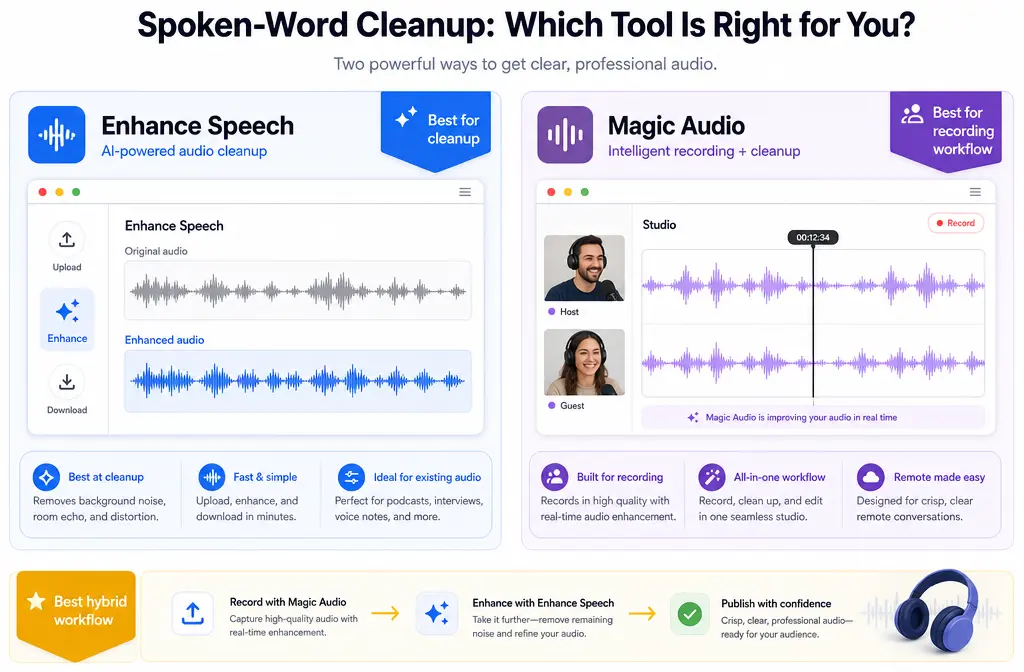
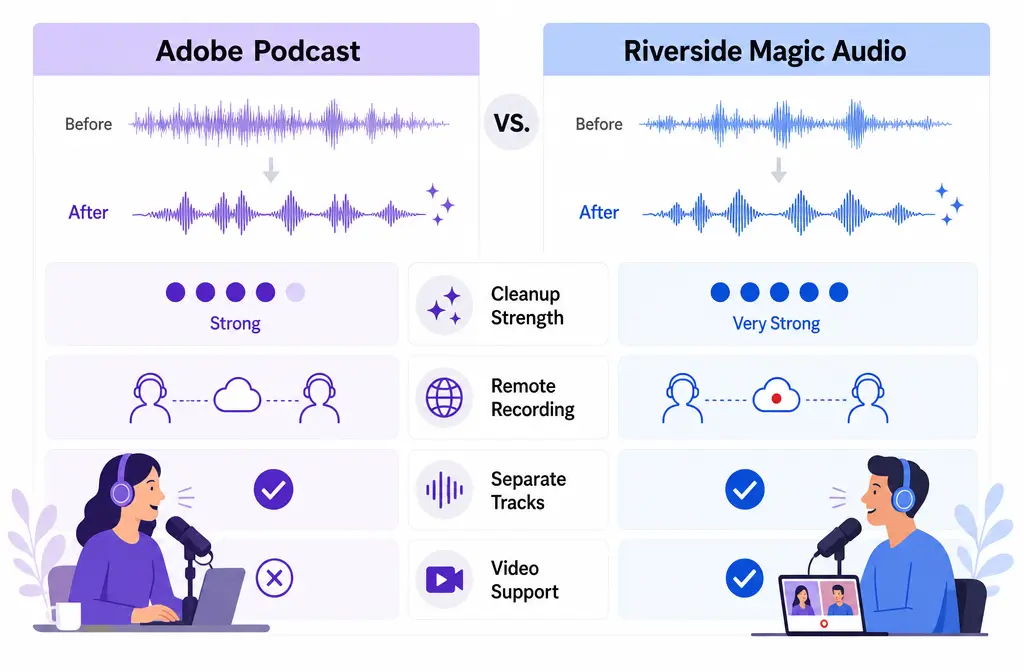
Adobe Podcast Enhance Speech is usually the better choice for the strongest after-the-fact voice cleanup on exported files. It is built around upload-and-enhance repair, supports audio and video uploads up to 1 GB, returns the same file format on download, and Adobe says Premium adds video support, bulk upload, strength controls, and up to 4 hours per day of enhancement.
Riverside Magic Audio is usually the better choice if your priority is recording remote interviews, keeping separate local tracks, and doing cleanup inside one recording and editing workflow. Riverside’s big advantage is not just enhancement. It is that Riverside can capture high-quality local tracks, generate Magic Audio WAV tracks, and let you keep raw files for later editing.
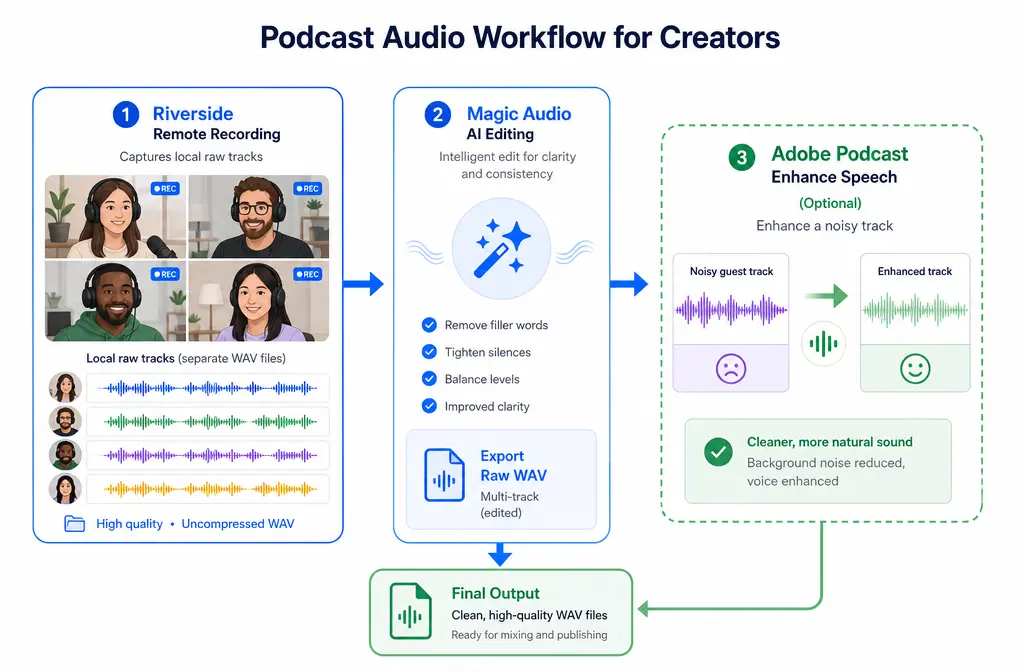
Best overall recommendation for many interview-based creators: record in Riverside, download the raw WAV or separate tracks first, then run the toughest voice problems through Adobe Podcast if cleanup quality matters more than one-platform convenience.
If you want a lighter-weight cleanup option for exported audio or video, SimpleClean is another tool from our team.
Fast verdict: who should choose what?
| Need | Best pick | Why |
|---|---|---|
| Quickest one-file speech cleanup after recording | Adobe Podcast | More post-fix oriented, with upload-based Enhance Speech workflow. |
| Remote podcast or interview recording with separate tracks | Riverside | Records local tracks and fits capture, editing, and enhancement in one stack. |
| Most flexible workflow for difficult guest audio | Use both | Record in Riverside, keep raw files, then repair tough tracks in Adobe. |
| One-platform convenience | Riverside | Recording, editing, and enhancement stay in the same project workflow. |
| Best chance of stronger repair on noisy spoken-word exports | Adobe Podcast | Usually the better fit when the file already exists and needs rescue. |
What each tool is actually for
Adobe Podcast: a post-fix speech enhancer
Adobe Podcast Enhance Speech is best understood as a cleanup tool for files you already have. According to Adobe’s official materials, it is web-based, supports uploads of audio and video up to 1 GB, and downloads in the same file format as the original upload. Adobe also notes that results depend on how audible the speaker is and how much noise is present in the source.
That makes Adobe a strong option when:
- You already recorded the audio elsewhere
- You have a noisy guest file that needs repair
- You want a simple upload-and-enhance step instead of a full recording platform
- You need to process exported video without splitting audio first
Riverside Magic Audio: enhancement inside a recording platform
Riverside Magic Audio is part of a broader recording and editing system. Riverside is not just trying to clean files after the fact. Its bigger value is that it records local high-quality tracks, supports remote interview workflows, and can generate Magic Audio WAV tracks alongside its other export options.
That makes Riverside a strong option when:
- You record remote podcasts or interviews regularly
- You want separate tracks for each speaker
- You want cleanup built into the same platform where you recorded
- You want the safety of raw local files before AI processing
So this comparison is not really “which podcast platform is better?” It is which cleanup workflow is better for spoken-word audio?
Key feature differences that matter for cleanup
1) Background noise, echo, and reverb
Adobe Enhance Speech is positioned as a speech-focused enhancer. Riverside says Magic Audio reduces background noise and reverb, which matters because many remote recordings suffer more from room sound than from steady hiss alone.
But there is an important Riverside-specific detail:
- Magic Audio is one Riverside enhancement feature.
- Remove background noise is a separate export-time toggle in the Riverside editor.
- Those two features are not the same thing, according to Riverside’s own support documentation.
This matters because many buyers think Riverside has one single cleanup engine. In practice, you may be comparing:
- Riverside raw local tracks
- Riverside Magic Audio tracks
- Riverside exports with the separate Remove background noise option enabled
- Adobe Enhance Speech on exported Riverside files
If you do not separate those cases, test results can get confusing fast.
2) Per-track vs project-level workflow
Riverside’s biggest cleanup advantage is workflow, not just sound. Because Riverside is built around recording sessions and separate participant tracks, it is easier to manage interview audio before you flatten everything into one finished file.
Adobe’s strength is different. It is usually more attractive when you want to repair a file after recording, especially if the problem is concentrated in one speaker track or one exported clip.
For interview shows, that often leads to the most practical recommendation in this article:
- Keep Riverside raw tracks
- Do not process your only copy
- If one guest sounds bad, repair that track after export instead of committing too early to a fully processed mixed file
3) File support and browser/device limits
Adobe officially supports audio and video uploads up to 1 GB, and the processed download keeps the original file format. Adobe also documents browser and technical requirements on its help pages.
Riverside’s support documentation explains its raw WAV and MP4 track options, Magic Audio WAV tracks, and supported device considerations for Magic Audio.
In plain English:
- Adobe is convenient when you already have a file to upload.
- Riverside is convenient when the file starts life inside Riverside.
4) Raw-track safety
For serious spoken-word work, Riverside has one major workflow edge: local recording plus raw track access. That gives you more ways to recover from bad AI processing later.
Best practice: download the raw files first. Do not let an AI-enhanced export become the only surviving version of the recording.
Pricing and plan limits: what to verify before you commit
This comparison is about cleanup quality and workflow fit, not squeezing meaning out of a pricing table without context. Still, plan limits matter.
- Adobe’s official plans page says Premium adds features including video support, bulk upload, strength controls, and up to 4 hours per day of enhancement.
- Riverside’s pricing and support pages should be checked for current plan access to Magic Audio and for any limits around separate-track downloads or export-related workflow features.
Because plans change, the safest buying move is to confirm the current details directly on the official pages before choosing a workflow:
If your decision depends on bulk cleanup, separate tracks, or video-file support, those plan details matter more than the monthly price alone.
Audio quality: when Adobe sounds cleaner, when Riverside sounds more natural
Based on the supplied research brief, the most defensible quality summary is this:
- Adobe often makes the stronger first impression on difficult, already-recorded voice problems.
- Riverside often makes more sense when you value natural workflow, local raw tracks, and in-platform editing convenience.
That does not mean Adobe always wins on sound for every file, or that Riverside always sounds more natural. Both tools are AI processing systems, and both can create overprocessed results if the input is poor or if the cleanup choice does not match the problem.
Adobe is usually the better bet when:
- The recording already exists and needs rescue
- One speaker is buried under moderate noise
- You want a dedicated enhancement pass after export
- You are willing to trade some naturalness for stronger cleanup
Riverside is usually the better bet when:
- You are recording remote guests and want the safest multitrack workflow
- You want to enhance inside the same environment where you recorded
- You care about keeping raw local tracks and choosing later
- The bigger problem is production workflow, not just one bad file
Either tool can sound overprocessed when:
- The original speech is too quiet or unclear
- Noise is extreme relative to the voice
- The track has heavy echo or room reflections
- You rely on AI enhancement to fix a fundamentally unusable recording
Adobe explicitly says results depend on speaker audibility and background noise. That is a useful reminder for both tools: AI cleanup helps most when the voice is still recoverable.
What to do before processing any file
Before you choose Adobe, Riverside, or a hybrid workflow, do this:
- Save the original raw audio or video first
- If recorded in Riverside, download the separate raw tracks before testing enhancements
- Listen for the main problem: steady noise, echo, clipping, low level, or overlapping speakers
- Test a short section before processing the full recording
- Compare processed audio against the raw file, not just against your memory
- Do not judge from laptop speakers alone if the project matters
This one checklist will prevent a lot of bad decisions.
Best workflow by scenario
| Scenario | Best choice | Why |
|---|---|---|
| Solo talking-head video | Adobe Podcast | Fast upload-based cleanup is often enough when there is only one voice. |
| Remote podcast interview | Riverside or both | Riverside handles local recording and separate tracks; Adobe can repair the worst speaker later. |
| Webinar replay | Adobe Podcast | Good fit for exported files that need speech-first cleanup after the event. |
| Noisy guest track | Use both | Keep the raw Riverside track, then test Adobe on just the damaged speaker audio. |
| Screen recording with voiceover | Adobe Podcast | Useful when you already have a finished audio or video file to enhance. |
| Ongoing interview-based production team | Riverside | Workflow, local capture, and project structure matter more over time. |
Hybrid workflow recommendation: record in Riverside, clean in Adobe when needed
For many creators, the best answer is not choosing one tool forever. It is choosing the right order.
Recommended hybrid workflow
- Record the interview in Riverside.
- Download the raw WAV or separate tracks first.
- Listen to each speaker before committing to Magic Audio or export-time noise removal.
- If the audio already sounds good, stay in Riverside for convenience.
- If one track is still rough, export that track and run it through Adobe Enhance Speech.
- Reassemble or replace only the problem speaker in your edit.
This approach gives you the best of both worlds:
- Riverside’s strong capture workflow
- Adobe’s strong post-fix positioning
- Protection against overprocessing the entire project
How to decide in 5 steps
- Start with the source. If the file already exists, Adobe is usually the first tool to test. If the recording has not happened yet and involves guests, start with Riverside.
- Protect the raw copy. Keep the untouched file or local Riverside tracks before applying any AI processing.
- Identify the real problem. Noise, reverb, bad mic tone, and poor recording workflow are different problems.
- Test the smallest workable unit. For interviews, test one speaker track instead of processing the whole mixed show first.
- Choose convenience or maximum repair on purpose. Riverside is better for all-in-one workflow. Adobe is usually better when rescue quality matters more than staying in one app.
Decision table: choose Adobe, choose Riverside, or use both
| If this sounds like you... | Choose |
|---|---|
| I have finished files and want the strongest speech cleanup first. | Adobe Podcast |
| I run remote interviews and need local tracks, editing, and enhancement together. | Riverside |
| I want the safest workflow for hard guest audio. | Use both |
| I mostly care about one-click convenience inside the recording platform. | Riverside |
| I need to repair exported audio or video after the recording is over. | Adobe Podcast |
Final verdict
Choose Adobe Podcast if your top priority is stronger after-the-fact speech cleanup. It is the better fit when you already have the file and want a repair-first workflow.
Choose Riverside if your top priority is remote recording, local track safety, and in-platform editing convenience. Magic Audio is part of a much bigger workflow advantage.
Choose both if you record interviews regularly and occasionally get a rough guest track. For many teams, that is the smartest setup: record in Riverside, preserve raw tracks, then bring the hardest files into Adobe only when needed.
For adjacent cleanup workflows, you may also find these guides useful:
- How to clean webinar recording audio
- Remove background noise from a Zoom recording
- Remove background noise from a Google Meet recording
- Remove echo in Premiere Pro without wrecking voice clarity
- Adobe Podcast vs iZotope RX
Sources
- Adobe Podcast plans
- Adobe Podcast technical requirements
- Adobe Podcast FAQ
- Riverside pricing
- Riverside Magic Audio tracks overview
- Riverside video and audio file formats overview
- Riverside: Remove background noise in the editor
- Riverside: Difference between Smart Mute, Magic Audio, normalizing, and remove background noise