Quick verdict
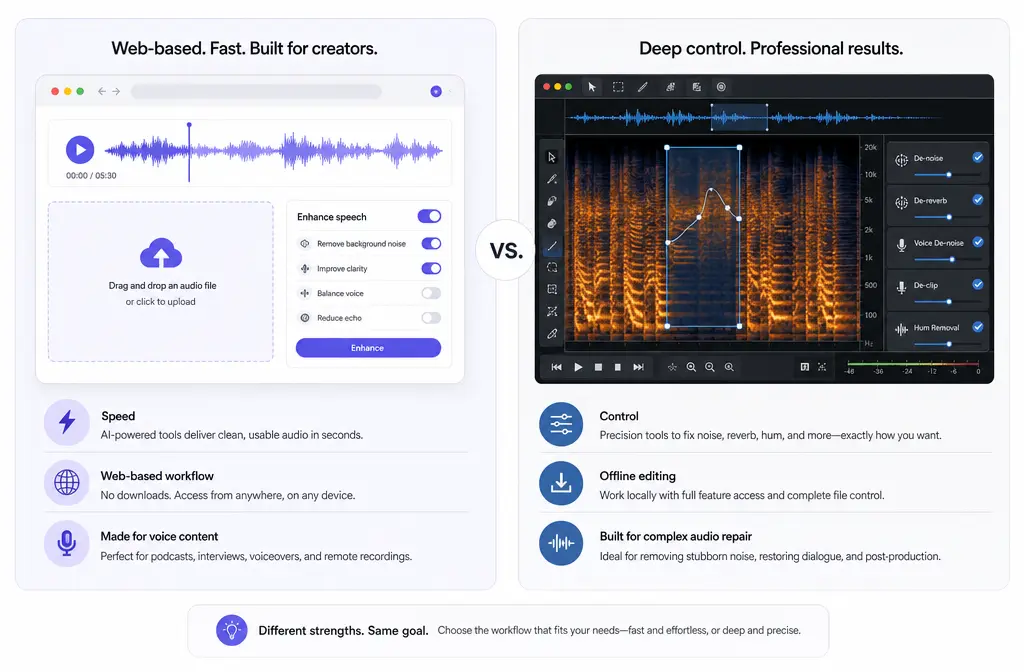
If you want the fastest way to clean up spoken-word audio, Adobe Podcast is usually the better pick. Adobe positions Enhance Speech as a web-based tool for improving voice recordings by reducing background noise and reverb with minimal setup.
If you need more control, selective repair, or offline editing, iZotope RX is the stronger choice. RX is a desktop restoration suite with 50+ modules in the editor and 20+ plugins, and it is better suited to targeted fixes and more complex cleanup workflows.
- Choose Adobe Podcast if you want fast, simple speech cleanup.
- Choose iZotope RX if you need deeper repair tools, local editing, or more control over the result.
Adobe Podcast vs iZotope RX at a glance
| Category | Adobe Podcast | iZotope RX |
|---|---|---|
| Best for | One-click speech enhancement | Targeted repair and restoration |
| Main workflow | Browser-based upload and process | Desktop editor and plugin workflow |
| Ease of use | Very easy | More learning required |
| Control level | Low to moderate | High |
| Offline use | No | Yes |
| Quick spoken-word cleanup | Strong fit | Possible, but slower |
| Clicks, hum, clipping, mixed defects | Less targeted | Better fit |
| Voice character tradeoff | Can sound more processed if pushed hard | Can sound more natural when tuned well |
| Pricing model | Free tier plus Premium plan | Paid desktop suite in multiple editions |
What each tool is built for
Adobe Podcast is built around speed and simplicity. Adobe’s Enhance Speech page presents it as a spoken-audio enhancement tool for reducing background noise and reverb in voice recordings. The appeal is straightforward: upload a file, process it, and get a cleaner speech track without learning a repair suite.
iZotope RX is built for repair. iZotope presents RX as a broader restoration ecosystem with specialized modules and plugins. Instead of relying on one general enhancement pass, RX lets you choose tools for specific problems, such as Voice De-noise for speech noise cleanup and Dialogue Isolate in RX Advanced for spoken-dialogue isolation.
That difference matters more than a generic features list:
- Adobe Podcast is a fast speech enhancer.
- RX is a full repair suite.
If your recordings are usually “good enough, just noisy,” Adobe Podcast often makes more sense. If your recordings are damaged in different ways and need selective treatment, RX is the stronger fit.

Pricing and access
Adobe Podcast offers a free tier and a Premium plan. According to Adobe’s plans page, Premium currently adds:
- Video support
- Bulk upload
- Enhancement strength controls
- Up to 1 GB max file size
- Up to 2 hours max duration
- Up to 4 hours of Enhance Speech per day
The free tier is more limited.
iZotope RX is sold as a paid desktop product in multiple editions. The official RX collection page lists these prices:
- RX 12 Elements: $99
- RX 12 Standard: $399
- RX 12 Advanced: $1,399
For most buyers, Adobe is easier to try, while RX requires a bigger commitment but offers a broader repair toolkit.
Platform and workflow differences
Adobe Podcast workflow
- Runs in the browser
- Centered on upload-and-enhance convenience
- Best when speed matters more than detailed control
- Useful for creators who do not want to manage plugins or a restoration editor
iZotope RX workflow
- Desktop-based
- Works as both an editor ecosystem and plugin set
- Better for local files, sensitive recordings, and offline work
- Better for selective cleanup instead of one global process
If you cannot upload client audio, RX has a clear workflow advantage because it supports local editing. If you just need a quick first pass on a podcast or YouTube voice track, Adobe Podcast is usually simpler.
Best by recording problem
| Problem | Better choice | Why |
|---|---|---|
| Steady fan or HVAC noise | Adobe Podcast for speed; RX for control | Adobe is faster for a first pass, while RX Voice De-noise is built for speech noise cleanup. |
| Bad room echo / reverb | Adobe Podcast for quick cleanup; RX if careful tuning matters | Adobe explicitly positions Enhance Speech around reducing noise and reverb, while RX offers a more selective workflow. |
| Electrical hum | iZotope RX | Hum is better suited to a defect-specific repair approach than a general speech enhancer. |
| Clicks and mouth noise | iZotope RX | These are targeted repair problems, which is where RX is stronger. |
| Clipped speech | iZotope RX | Clipping is a restoration problem, not just a voice-enhancement problem. |
| Mixed defects in one file | iZotope RX | When one recording has several issues, selective modules usually beat one global pass. |
| Fast cleanup for a podcast draft | Adobe Podcast | It is the easier one-click option for spoken-word polish. |
| Need the most natural result with time to tune | iZotope RX | Its added control can help preserve more of the original voice when used well. |
There is no universal winner. Adobe often wins on turnaround time. RX often wins when the defect is specific and the repair needs to be selective.
Ease of use vs control
Adobe Podcast wins on ease of use. You do not need to decide which module to open or which process to apply first. That simplicity is a real advantage for solo creators and fast publishing workflows.
RX wins on control. You can target the exact problem instead of applying one broad enhancement pass to the whole file.
A practical way to think about it:
- Adobe Podcast: “Can this sound better fast?”
- iZotope RX: “What exactly is wrong with this file, and how do I fix only that?”
This also explains a common quality tradeoff. Adobe can sound more processed when pushed aggressively, while RX can preserve more of the original voice when tuned carefully. That is an inference based on the difference between one-click enhancement and manual repair, not a direct vendor claim.

Which RX edition is enough for creators?
If you are comparing RX editions, the edition choice matters almost as much as the brand choice.
- RX Elements is the budget entry point for basic cleanup.
- RX Standard is the better fit for creators who expect to do regular repair work.
- RX Advanced is the high-end option and includes Dialogue Isolate, which iZotope positions for spoken-dialogue isolation.
For many podcasters and video creators, the real question is whether Standard is enough. If you mostly clean up voice tracks with occasional repair needs, it often will be. If you regularly rescue difficult dialogue, the higher tiers make more sense.
Best for different creator types
Best for podcasters
Adobe Podcast is the better fit for many podcasters who want fast spoken-word cleanup and minimal setup.
Best for YouTubers and course creators
Adobe Podcast makes sense when you need quick improvement on voice-driven content. Adobe Podcast Premium also adds video support, which matters if you are working directly with video files.
Best for interview cleanup
It depends on the defect. If the issue is general room noise or light reverb, Adobe is the faster first pass. If the interview has hum, clicks, clipped words, or multiple defects at once, RX is the safer choice.
Best for documentary or dialogue repair
iZotope RX is the stronger option because the workflow is built for restoration, selective repair, and local control.
Best for batch creator workflows
Adobe Podcast Premium becomes more attractive if you want bulk upload and a simpler repeatable process. RX can fit professional workflows too, but it asks more of the operator.
If you only have 5 minutes, want the most natural result, or cannot upload audio
- If you only have 5 minutes: choose Adobe Podcast.
- If you want the most natural result and can spend time tuning: choose iZotope RX.
- If you cannot upload client audio: choose iZotope RX.
When neither is ideal
Sometimes the best answer is not a full repair suite or a premium audio workflow. If you just need a simple browser-based fallback for straightforward voice cleanup, SimpleClean is another tool from our team and may be enough for the job.
How to choose between Adobe Podcast and iZotope RX
- Identify the main defect. If it is general speech noise or mild reverb, Adobe may be enough. If it is hum, clicks, clipping, or several issues at once, lean toward RX.
- Decide how much control you need. If you want one-click cleanup, Adobe fits better. If you want selective repair, RX fits better.
- Check your workflow constraints. Need offline editing or cannot upload files? Choose RX.
- Match the tool to your volume. Frequent quick-turn speech jobs favor Adobe’s simpler flow. Occasional but difficult rescue work favors RX.
- Be honest about learning time. RX can do more, but only if you are willing to learn it.
Final verdict
Adobe Podcast is better for fast, one-click speech cleanup. It is usually the smarter choice for podcasters, solo YouTubers, and creators who mainly want cleaner voice audio with as little friction as possible.
iZotope RX is better for repair, control, and difficult recordings. It is the smarter choice if you work with hum, clicks, clipping, mixed defects, sensitive local files, or projects where the cleanup needs to be more selective.
So which cleans up voice audio better? For speed, Adobe often wins. For precision and harder problems, RX usually wins.
The right pick depends less on brand and more on the kind of damage you need to fix.
FAQ
Is Adobe Podcast better than iZotope RX for podcasts?
For many podcasts, yes, if your priority is fast spoken-word cleanup. RX is better when the recording has specific repair problems that need more than a one-click enhancement pass.
Which iZotope RX edition is enough for creators?
RX Elements is the entry-level option, RX Standard is the stronger middle option for regular repair work, and RX Advanced is aimed at users who need the deepest feature set, including Dialogue Isolate.
Does Adobe Podcast remove echo better than RX?
Adobe explicitly positions Enhance Speech for reducing reverb, so it is often the quicker option for echoey speech. RX may still be the better choice when you need a more selective, carefully tuned result.
Is RX overkill for podcasts?
Sometimes, yes. If your podcast recordings mostly need quick polish, RX may be more tool than you need. It becomes more worthwhile when your files regularly need targeted repair.
Is iZotope RX worth it if I only edit speech?
It can be, especially if your speech recordings often need specific repair or offline handling. If you mostly want quick polish on standard voice tracks, Adobe Podcast may be the better value.
Can Adobe Podcast handle video files?
Yes. Adobe Podcast Premium currently adds video support according to Adobe’s plans page.
Does RX work offline?
Yes. RX is a desktop-based restoration suite, so it supports local and offline workflows.
Sources and further reading
- Adobe Podcast plans - Supports free vs Premium framing, video support, bulk upload, enhancement strength controls, and current file and usage limits.
- Enhance Speech v2 from Adobe - Supports Adobe Podcast positioning around spoken-audio enhancement and reduction of background noise and reverb.
- What's new in Adobe Podcast? - Supports mention of product update context and enhancement controls in v2.
- iZotope RX collection - Supports RX edition names and official list pricing.
- RX features - Supports claims about the editor, plugin ecosystem, and 50+ modules and 20+ plugins.
- Voice De-noise help documentation - Supports plain-language framing of Voice De-noise for speech noise cleanup.
- RX Advanced features / Dialogue Isolate - Supports mention of Dialogue Isolate and its positioning within RX Advanced.