Quick Answer
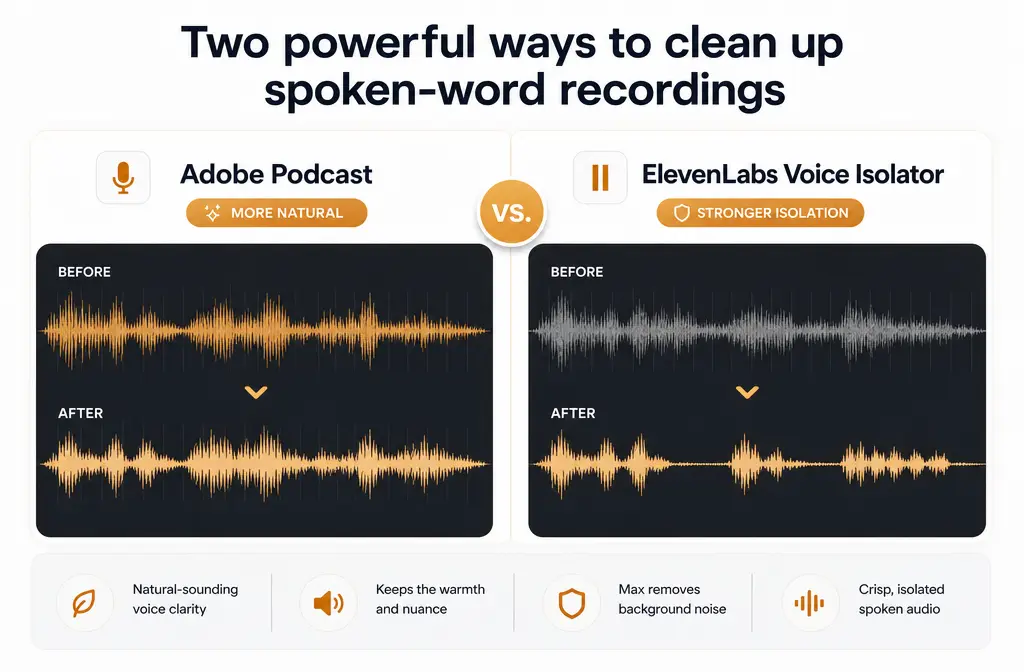
As editorial workflow guidance, Adobe Podcast Enhance Speech is usually the better first pick when your goal is to make spoken dialogue sound cleaner while still feeling natural. ElevenLabs Voice Isolator is usually the better first pick when the recording has heavier competing sound, like background music, traffic, or chaotic ambience, and your priority is stronger voice extraction.
That does not mean one tool wins every time. These tools aim at slightly different cleanup outcomes:
- Adobe Podcast Enhance Speech: usually the better fit when you want cleaner speech with some control over how much background remains.
- ElevenLabs Voice Isolator: usually the better fit when you need the voice separated more aggressively from noise, ambient sound, or music.
- Neither is a true fix for overlapping speakers, severe clipping, or badly overprocessed source audio.
Adobe Podcast vs ElevenLabs Voice Isolator at a Glance
| Category | Adobe Podcast Enhance Speech | ElevenLabs Voice Isolator |
|---|---|---|
| Best for | Natural-sounding spoken dialogue cleanup | Stronger speech isolation from intrusive background sound |
| Positioning | AI speech enhancement for audio and video dialogue | Speech extraction from background noise, ambient sound, and music |
| Controls | Enhance strength plus isolated speech and background loudness controls in v2 | Focused on isolation workflow rather than ambience-retention controls |
| Video support | Yes, Adobe explicitly documents enhancing video audio in a browser workflow | Yes, official docs list audio and video file support |
| File types | Adobe supports uploaded audio and video for Enhance Speech | Supports many audio and video formats including MP3, WAV, FLAC, MP4, MOV, and more |
| Documented limits | Adobe cites free use plus Premium expansion up to 4 hours per day and 1 GB files | Official docs cite up to 500 MB and 1 hour per file |
| Workflow feel | Better fit for “make this dialogue sound better” | Better fit for “pull the voice out of this mess” |
| Biggest risk | Can still sound processed if pushed too hard or fed difficult source audio | Stronger isolation can reduce noise but may sound less natural or more artifact-prone |
The practical difference is simple: Adobe leans toward enhancement, while ElevenLabs leans more toward isolation.
What Each Tool Is Actually For
Adobe Podcast Enhance Speech
Adobe describes Enhance Speech as a way to remove background noise and echo and improve dialogue quality. Its newer version also adds controls for speech enhancement, background loudness, and isolated speech, which matters if you want cleanup without stripping away every bit of room tone. Adobe also specifically documents a browser workflow for enhancing video, not just standalone audio.
In practical editing terms, Adobe is usually the better fit when:
- The voice is already understandable but messy
- You want the result to still feel like a real mic in a real room
- You need a fast browser pass on podcast, interview, course, or talking-head audio
- You want some say over how much background remains
ElevenLabs Voice Isolator
ElevenLabs positions Voice Isolator around extracting speech from background noise, ambient sound, and music. Its docs also say it supports a wide range of audio and video file types and allows files up to 500 MB and 1 hour. ElevenLabs also notes that Voice Isolator is not specifically optimized for isolating vocals from music tracks, though it may work depending on the content.
That positioning matters. In practice, ElevenLabs is usually the better first try when:
- The noise is actively competing with the speaker
- There is music under speech
- You care more about extracting usable words than preserving natural ambience
- The recording sounds busy rather than merely rough

Which Tool Handles Each Audio Problem Better?
| Audio problem | Better first pick | Why |
|---|---|---|
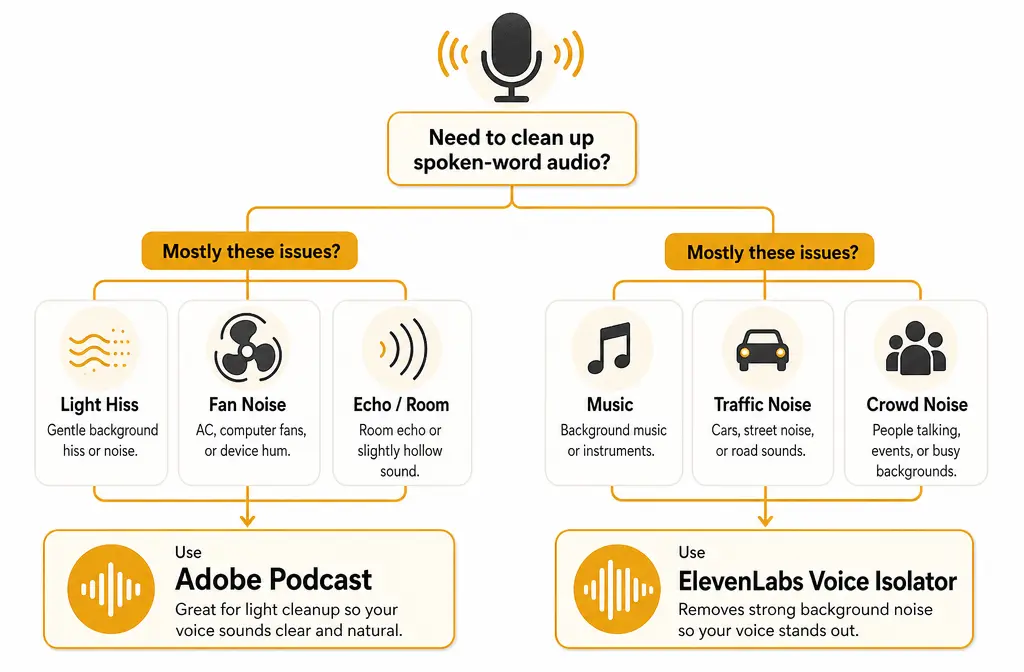
| Steady fan, HVAC hum, light hiss | Adobe Podcast | Usually a better match for light cleanup when the goal is natural spoken voice |
| Room echo or roomy laptop-mic sound | Adobe Podcast, with caution | Adobe explicitly positions Enhance Speech around echo cleanup, but bad echo can still sound processed |
| Traffic or busy outdoor ambience | ElevenLabs | Usually the better first try when the voice must be pulled away from stronger competing sound |
| Background music under dialogue | ElevenLabs | Its product positioning is more aligned with speech extraction from music or noisy beds |
| Crowd noise or chaotic room sound | ElevenLabs | A stronger isolation-style approach is often the more practical first pass |
| Overlapping speakers | Neither | Neither tool is a true dialogue-separation solution for two people talking over each other |
| Clipped, distorted, or overprocessed voice | Neither | These tools are not documented as reliable fixes for severe source damage |
This is the biggest buying mistake to avoid: people often compare these tools as if they are aiming for the same sound. They are not. One is usually better for natural enhancement. The other is usually better for harder isolation.
Sound Character: Naturalness vs Aggressiveness vs Artifact Risk
When editors ask, “Which one sounds better?” the right follow-up is, “Better for what?”
- Adobe Podcast usually sounds more natural when the source is already mostly usable and just needs cleanup.
- ElevenLabs usually isolates voice more aggressively when the noise floor is higher or the background is more intrusive.
- Aggressive isolation can trade realism for intelligibility. You may remove more noise but end up with a voice that feels less lifelike.
Adobe’s documentation around Enhance Speech for video emphasizes natural-sounding dialogue cleanup, which fits interview edits, course videos, webinars, and talking-head content where an overly stripped voice can feel distracting. ElevenLabs, by contrast, is more directly framed around extracting speech out of competing sound.
So if your listener will notice robotic edges faster than low-level room tone, start with Adobe. If your listener cannot understand the words because of the environment, start with ElevenLabs.
Workflow Speed and Editing Fit
Both tools are designed to be faster than traditional repair workflows, but they fit different stages of editing.
Adobe fits best when:
- You are working in a browser and want a fast upload-preview-export pass
- You are cleaning dialogue from a podcast, interview, screen recording, or video clip
- You want one enhancement step before your main edit or final export
- You may want to retain some background instead of fully stripping it
ElevenLabs fits best when:
- You have a recording where background sound is the real problem
- You need stronger extraction before cutting captions, clips, or transcripts
- You are dealing with speech over music or noisier ambience
- You are okay prioritizing intelligibility over perfect naturalness
If your workflow starts with an NLE or podcast editor and ends with a final export, there is also a third path: export once, then run a dedicated cleanup pass on the finished spoken-word file. That is often easier than bouncing between multiple AI enhancers trying to force one tool to solve every problem.
For related comparisons, see Adobe Podcast vs iZotope RX if you are weighing fast AI cleanup against targeted restoration, or how to clean webinar recording audio if your source is a platform export rather than a studio recording.
How Pricing and Limits Affect the Choice
For heavier workloads, the limits matter almost as much as the sound.
- Adobe Podcast: Adobe’s official guide highlights free use and says Premium expands usage to 4 hours per day and 1 GB file uploads.
- ElevenLabs Voice Isolator: official documentation lists file support up to 500 MB and 1 hour. ElevenLabs also frames broader usage around platform limits and API metering.
That means Adobe may be the more comfortable fit for longer-form spoken content, while ElevenLabs may require more attention if you regularly process long recordings or larger files. If you are comparing tools for frequent batch cleanup, check the current plan details inside each product before committing.
When Adobe Podcast Is the Better Pick
- Your recording has light to moderate noise rather than full-on competing sound
- You want the result to sound cleaner, not heavily isolated
- You are fixing room tone, fan noise, hiss, or mild echo
- You are enhancing podcast monologues, interviews, webinars, lessons, or talking-head video
- You want controls that let you shape speech versus background balance
If that sounds like your project, Adobe is usually the safest first pass.
When ElevenLabs Voice Isolator Is the Better Pick
- You need to pull speech out of a noisier environment
- There is background music under the dialogue
- You are rescuing speech from street noise, crowd sound, or busy ambience
- You care more about intelligibility than retaining natural room feel
- You want a tool whose product framing is directly about voice extraction
If your recording feels like the environment is fighting the speaker, ElevenLabs is usually the more logical first try.
When Neither Is Ideal
Some voice problems are not really “cleanup” problems. They are source problems.
Neither Adobe Podcast nor ElevenLabs Voice Isolator is the ideal answer when:
- Two people are talking over each other
- The recording is clipped or badly distorted
- The mic is too far away and the room reflection dominates everything
- The file has already been overprocessed and sounds brittle or watery
- You are stacking multiple AI passes and making the voice less believable each time
If both tools improve the file but still leave hum, echo, or artifacts after export, a separate cleanup pass can be simpler than repeatedly reprocessing the original. Disclosure: SimpleClean is another tool from our team and can be used as a post-export fallback for spoken-word cleanup.
How to Choose Between Adobe Podcast and ElevenLabs Voice Isolator
- Listen for the real problem. Is the voice mostly fine but rough, or is the background actively masking words?
- Start with Adobe if the issue is light noise, mild echo, hiss, or general roughness.
- Start with ElevenLabs if the issue is background music, traffic, crowd noise, or busy ambience.
- Compare short test exports. Judge both intelligibility and believability, not just noise reduction.
- Do not stack passes blindly. If a second AI pass makes the voice papery, robotic, or phasey, stop.
- Use a post-export cleanup fallback if the first tool helps but still leaves hum, echo, or artifacts.
Final Verdict
As editorial workflow guidance, Adobe Podcast is usually the better first choice when the voice is already usable and you want it to sound cleaner without losing all realism. ElevenLabs Voice Isolator is usually the better first choice when the background is more intrusive and the priority is pulling the voice forward.
So the fastest decision is this:
- Choose Adobe for natural enhancement.
- Choose ElevenLabs for stronger isolation.
- Choose a separate post-export cleanup workflow when neither one fully solves the file without side effects.
That framing will get you to the right first test much faster than broad brand-vs-brand comparisons.
FAQs
Is Adobe Podcast better than ElevenLabs Voice Isolator?
Usually for natural dialogue cleanup, yes. For stronger extraction from intrusive noise or music, ElevenLabs is often the better first test.
Which is better for removing background music from dialogue?
ElevenLabs Voice Isolator is usually the better first pick for dialogue with background music because its positioning is more directly about extracting speech from music and other competing sound. ElevenLabs also notes it is not specifically optimized for isolating vocals from music tracks, so results can vary by source.
Does Adobe Podcast remove echo better than ElevenLabs?
Adobe explicitly positions Enhance Speech around reducing echo as well as noise, so it is usually the more natural first try for echoey spoken dialogue. Severe room echo can still be difficult for any one-click tool.
Does ElevenLabs Voice Isolator sound more natural?
Usually no, if naturalness is the main goal. ElevenLabs is generally the better choice for stronger isolation, while Adobe is generally the better choice for a more natural cleaned-up dialogue sound.
Can Adobe Podcast enhance video audio files?
Yes. Adobe provides an official Enhance Speech for video workflow in the browser.
What file formats does ElevenLabs Voice Isolator support?
According to ElevenLabs documentation, Voice Isolator supports a wide range of audio and video formats, including MP3, WAV, FLAC, OGG, AAC, AIFF, M4A, MP4, MOV, and WebM.
Which tool is better for podcast interviews recorded in noisy rooms?
If the issue is mostly roominess, light fan noise, or mild echo, start with Adobe Podcast. If the room also includes heavier competing sound like crowd noise, traffic, or music bleed, ElevenLabs is usually the better first test.