Quick Answer
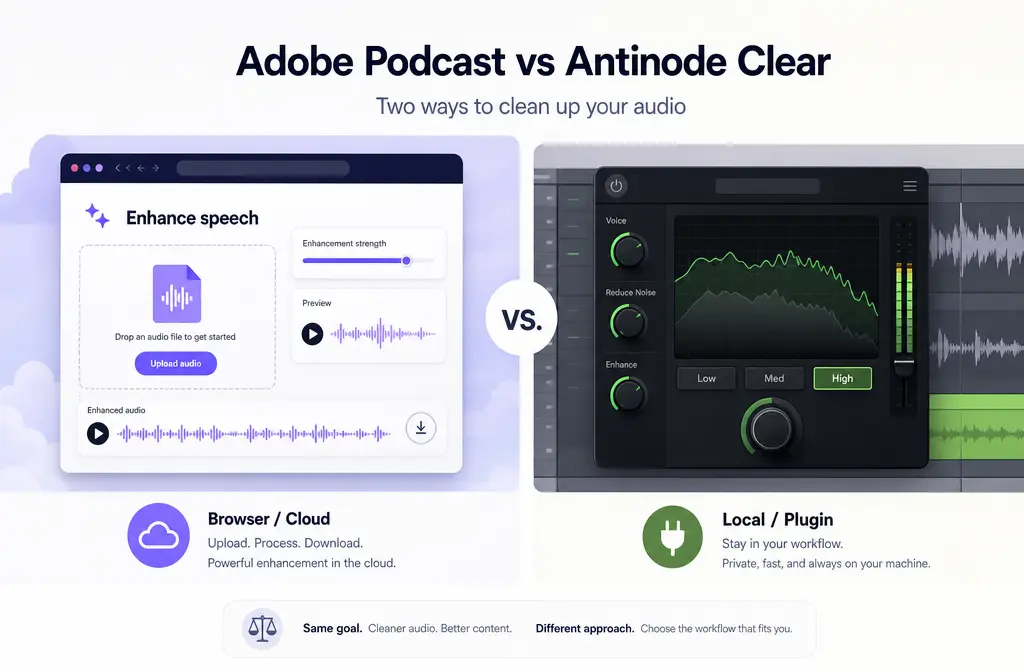
If you need the fastest, cheapest way to clean up a noisy spoken-word recording in a browser, Adobe Podcast usually wins. It is the simpler choice for short voice files, occasional rescue jobs, and creators who do not need a plugin workflow.
If you want local processing inside a DAW or video editor, real-time monitoring, and more control over cleanup without uploading files, Supertone Clear is the better fit. Just note that the product is now officially called Antinode Clear, even though many people still search for “Supertone Clear.”
The short version:
- Pick Adobe Podcast if you want one-click cloud cleanup for spoken audio, especially short files and occasional fixes.
- Pick Supertone/Antinode Clear if you want a local plugin for ongoing editing work in a DAW or NLE, or you do not want upload-based processing.
- Pick neither if your material is music-heavy, ambience-heavy, or badly damaged enough to need surgical restoration rather than broad voice enhancement.
| Best for | Winner | Why |
|---|---|---|
| Fastest one-click browser cleanup | Adobe Podcast | Upload, process, download; built for simple spoken-word rescue. |
| Offline/local workflow | Supertone Clear / Antinode Clear | Runs locally as a plugin on macOS and Windows. |
| DAW or NLE editing | Supertone Clear / Antinode Clear | Available in AU, VST, VST3, and AAX plugin formats. |
| Real-time monitoring | Supertone Clear / Antinode Clear | Officially supports real-time processing. |
| Cheap occasional use | Adobe Podcast | Free tier exists for audio-only spoken cleanup within its limits. |
| Short speech rescue with minimal setup | Adobe Podcast | No plugin install or DAW routing needed. |
For creators comparing Adobe Podcast vs Supertone Clear, the real decision is not just sound quality. It is browser rescue tool vs local plugin workflow.
Important naming note: Supertone Clear is now Antinode Clear
Before comparing them, one accuracy note matters: the tool many people still call Supertone Clear is now part of Antinode Audio branding and is currently sold as Antinode Clear. Search demand still uses the old name, so this article uses both names, but the current official product name is Antinode Clear. You can verify that on the Antinode Audio homepage and the Antinode Clear product page.

What each tool actually is
Adobe Podcast
Adobe Podcast’s Enhance Speech is a web-based cleanup tool aimed at spoken-word recordings. Adobe’s own explanation of what Enhance Speech is positions it around voice enhancement rather than full-spectrum restoration for every audio type. In practice, that makes it attractive for podcasters, solo YouTubers, interview clips, webcam audio, and rough dialogue that needs quick cleanup.
Supertone Clear / Antinode Clear
Antinode Clear is a local audio plugin sold as a one-time purchase. According to the official Antinode Clear product page, it supports AU, VST, VST3, and AAX, works on macOS and Windows, supports Apple Silicon, and offers real-time processing. That makes it fundamentally different from Adobe’s upload-and-process model.
Adobe Podcast vs Supertone Clear: workflow differences that actually matter
This is where most buying decisions get made.
| Category | Adobe Podcast | Supertone Clear / Antinode Clear |
|---|---|---|
| Core format | Browser service | Local plugin |
| Processing style | Upload, process, download | Insert on a track or bus inside host software |
| Offline use | No, cloud-based workflow | Yes, local processing |
| Real-time monitoring | Not the main workflow described in sources | Yes, officially supports real-time processing |
| Best fit | Occasional speech rescue | Ongoing editing and monitoring workflow |
| Privacy model | Requires upload | Processes locally |
If your normal workflow is “export audio, upload it, wait, download it, re-import it,” Adobe Podcast feels easy. If your normal workflow is “drop a plugin on the dialogue track and keep editing,” Antinode Clear is the more natural choice.
Official Adobe limits: free vs Premium
Adobe’s official features page gives the clearest split between the free and Premium versions.
Adobe Podcast free plan
- Audio-only Enhance Speech
- Up to 30 minutes per file
- Up to 500 MB file size
- Up to 1 hour per day
Adobe Podcast Premium
- Adds video support
- Adds bulk upload
- Adds strength adjustment
- Up to 2 hours max duration
- Up to 1 GB file size
- Up to 4 hours per day
That means a very common creator question has a clear answer: no, video cleanup is not part of Adobe Podcast’s free Enhance Speech tier based on the official feature comparison.
These limits matter more than people expect. If you only clean a few short podcast takes or voiceovers per week, Adobe’s free plan may be enough. If you regularly process longer interviews, videos, or multiple takes in a day, those caps quickly become part of the decision.
Official Antinode Clear facts
Antinode Clear’s official product and download pages support these buyer-relevant facts:
- It is sold as a one-time purchase.
- It is a local plugin, not a browser upload service.
- It supports AU, VST, VST3, and AAX.
- It supports macOS and Windows.
- It supports Apple Silicon.
- It offers real-time processing.
- Its trial inserts noise every 60 seconds, as noted on the Antinode Clear download page.
So while Adobe Podcast is easier to try instantly, Antinode Clear is the better match if your work lives inside Premiere, Pro Tools, Audition, Reaper, Logic, or another plugin-capable environment.
Which sounds better on noisy voice audio?
For most people, the better question is not “which one is best?” but “which one fails in a less annoying way for my kind of material?”
Adobe Podcast usually works better when:
- You have a spoken recording that just needs fast cleanup
- You want stronger one-click transformation
- You are rescuing bad webcam, phone, or rough podcast dialogue
- You care more about speed and intelligibility than subtle ambience preservation
Supertone Clear / Antinode Clear usually makes more sense when:
- You want to stay inside your editor or DAW
- You need real-time monitoring while you edit or record
- You dislike upload-based workflows
- You want a local cleanup option that may preserve a more natural sense of space in lighter correction situations
The independent Ronin Asylum comparison is helpful here because it frames the tradeoff around artifacts, speed, and control. That is a better lens than generic feature checklists. Adobe tends to be the more aggressive “make this voice usable now” option. Clear is better understood as a plugin-native cleanup tool for editors who want local control and lower-friction integration in production workflow.

Artifact tradeoff: when Adobe sounds too processed vs when Clear sounds more natural
This is the most important listening tradeoff.
Adobe Podcast’s strength is that it can make a poor spoken recording sound dramatically cleaner very quickly. The downside of stronger one-click processing is that some users will hear it as more processed, especially if the original recording has lots of room tone, changing ambience, or difficult echo.
Antinode Clear’s appeal is different. The official product positioning on the Antinode Clear page and the independent Ronin Asylum comparison both support viewing it as a tool for editors who want plugin-based control and real-time use inside the session.
So if your question is “Which sounds more natural?” the safer answer is:
- Adobe Podcast often wins on dramatic before/after cleanup.
- Supertone/Antinode Clear may be the better fit when you want local plugin handling and a less heavy-handed workflow.
Neither conclusion is universal. Both depend heavily on how bad the source is and how much cleanup you are trying to force from it.
What each tool is best at by audio problem
| Problem type | Better choice | Why |
|---|---|---|
| Steady background noise on spoken voice | Adobe Podcast | Fast one-click speech-focused cleanup is its core use case. |
| Room echo or light reverb on voice | Depends | Adobe may do a stronger rescue; Clear may fit editors who want local plugin workflow and more controlled use. |
| Mixed-content video with music or ambience | Neither is ideal | Both are better framed around spoken-word cleanup than complex full-mix restoration. |
| Severe damage needing surgical repair | Neither is ideal | The supplied research brief specifically notes deeper restoration cases where surgical tools like RX still win. |
| Live or monitored workflow | Supertone Clear / Antinode Clear | Officially supports real-time processing. |
| Quick exported dialogue rescue | Adobe Podcast | Very low setup friction if upload-based processing is acceptable. |
Privacy and offline use
If privacy or offline work matters, this comparison gets easier.
- Adobe Podcast: cloud-style workflow that requires uploading files for processing.
- Antinode Clear: local plugin workflow that runs on your machine, per the official product page.
That makes Antinode Clear the stronger choice for editors who handle client work, sensitive recordings, or simply prefer not to send raw dialogue through an upload-based tool during editing.
Best-for recommendations
Best for podcasters
Adobe Podcast, if you mostly need fast speech cleanup on occasional bad takes and want the easiest possible path.
Best for YouTubers
Adobe Podcast for quick exported voice rescue, especially if your files are short and speech-dominant. If your editing workflow is more advanced and plugin-based, Antinode Clear becomes more attractive.
Best for Premiere editors
Antinode Clear, because plugin-native local workflow is usually more convenient than constant export-upload-download-reimport cycles.
Best for DAW users
Antinode Clear, clearly. AU, VST, VST3, and AAX support make it the more natural fit.
Best for livestreamers or real-time monitoring
Antinode Clear, because real-time processing is an official part of the product.
Best for occasional creators on a budget
Adobe Podcast, because the free tier can be enough if you stay within the official caps.
Best for client work and local-only preference
Antinode Clear, because local processing avoids upload-based handling.
Hybrid workflow: when using both can make sense
You do not always have to choose one forever.
A practical split looks like this:
- Use Adobe Podcast for emergency rescue on rough spoken files that need the strongest fast cleanup.
- Use Antinode Clear during editing or monitoring when you want local processing inside your normal session.
That hybrid approach is especially sensible for editors who occasionally receive terrible speech recordings but still prefer a plugin-based local workflow for most of their day-to-day work.
How to choose in under 2 minutes
- Start with your workflow. If you want browser upload and instant cleanup, choose Adobe. If you want a plugin in your DAW or NLE, choose Antinode Clear.
- Check your file type and length. If you need video cleanup in Adobe, you need Premium. If your files are longer than the free cap, factor that in immediately.
- Decide how much you care about local processing. If cloud upload is a deal-breaker, Adobe is out.
- Think about monitoring. If you need real-time processing while editing or recording, Antinode Clear is the better fit.
- Be honest about your material. If it is not mostly speech, neither tool may be the right answer.
If you are comparing alternatives because you just want a simple way to clean podcast audio with SimpleClean, that can also be worth testing against your real source files before you commit to a longer-term workflow.
Should you use either for music, ambience, or non-speech audio?
Usually, no—not as a first choice.
The supplied sources point both tools toward spoken-word cleanup. If your clip includes important music, environmental texture, or a complex mix where the non-voice elements matter, these tools are less likely to be ideal. They are much easier to recommend for dialogue than for full-scene audio preservation.
Final verdict
Adobe Podcast wins for the cheapest and fastest browser cleanup of short spoken files. It is the better choice for casual podcasters, solo creators, and anyone who wants one-click speech rescue without installing a plugin.
Supertone Clear, now Antinode Clear, wins for local plugin workflows, real-time monitoring, offline use, and editors who want cleanup to happen inside a DAW or NLE rather than through file upload.
If you are deciding purely on workflow, the answer is simple:
- Choose Adobe Podcast for quick cloud cleanup.
- Choose Antinode Clear for local plugin-based editing and monitoring.
And if you are still testing options, SimpleClean is another easy way to compare results on the kind of noisy speech files you actually work with.
Related comparisons and guides
- Adobe Podcast vs ElevenLabs Voice Isolator
- Adobe Podcast vs Riverside Magic Audio
- Adobe Podcast vs iZotope RX
- Remove Background Noise from YouTube Video
FAQ
Is Supertone Clear the same as Antinode Clear?
Yes. The product many users still search for as Supertone Clear is now officially branded as Antinode Clear, as shown on the Antinode site.
Does Adobe Podcast support video cleanup on the free plan?
No. Adobe’s official features page shows that free Enhance Speech is audio-only. Video support is listed under Premium.
Which sounds more natural: Adobe Podcast or Supertone Clear?
Adobe Podcast often gives the more dramatic one-click cleanup, but that can also sound more processed. Supertone Clear, now Antinode Clear, is often the better fit for editors who want a local plugin workflow and less heavy-handed handling.
Can I use Supertone Clear offline?
Yes. Antinode Clear is a local plugin for macOS and Windows, so its workflow does not depend on browser upload processing.
Is Adobe Podcast better for echo than Supertone Clear?
For quick rescue of spoken audio with room problems, Adobe Podcast is often the easier first try. But if you need local plugin workflow, monitoring, and control inside your editor, Antinode Clear may still be the better overall fit.
Which is better for Premiere Pro or DAW workflows?
Antinode Clear is usually better because it is a local plugin with AU, VST, VST3, and AAX support and real-time processing, according to the official product page.
Is a one-time plugin cheaper than Adobe Podcast Premium?
Over time, it can be, but this article does not compare exact total cost because the supplied sources here confirm Antinode Clear’s one-time-purchase model and Adobe’s plan differences, not a long-term cost analysis across changing subscription periods.
Can either tool clean music, ambience, or non-speech audio well?
They are better understood as speech-focused cleanup tools. For music-heavy or ambience-critical material, neither is the safest default recommendation.
Sources and further reading
- Denoisr: Best Adobe Podcast Alternative for Voice Cleanup - Independent source reinforcing real-world buyer concerns around Adobe usage caps and limitations.